

Start a project fresh
Reuse a project in rlx without onboarding it again. Start fresh stops its agents, clears its board and fleet, and starts a blank manager, so the next task is #1. Your checkout and every other project are never touched.
You finished one piece of work in a project and want to start the next from a clean slate: no old tasks on the board, no finished agents in the sidebar, and a manager that does not read the last goal back. Start fresh does that in one step, and keeps everything that is not the board and the fleet.
What it clears, and what it keeps
Always cleared:
- Every live agent of the project, stopped as
rlx fleet shutdownstops it, and the project's tmux session. - Each agent's worktree.
- The board: tasks, notes and events, sessions, signals and marks.
- Work briefs, with the evidence they keep.
- The fleet's rows, and the manager's state file, so the new manager starts blank.
Task and brief numbers start at #1 again, and a new blank manager starts.
Cleared only if you ask:
In rlx | Flag | What it clears |
|---|---|---|
| Project memory (context entries) | --memory | What the project's memory holds. |
| Prompt log & metrics | --prompts | The project's prompt history and turn metrics. |
| Fleet git branches | --branches | The local fleet/<codename>/… branches its agents made. A remote branch is never deleted. |
Never touched: your checkout and every branch that is not a fleet branch, the project's registration and settings, its symbol index, and every other project. Command reports are not deleted; with their briefs gone they are no longer pinned as evidence, and their normal retention takes them.
In rlx
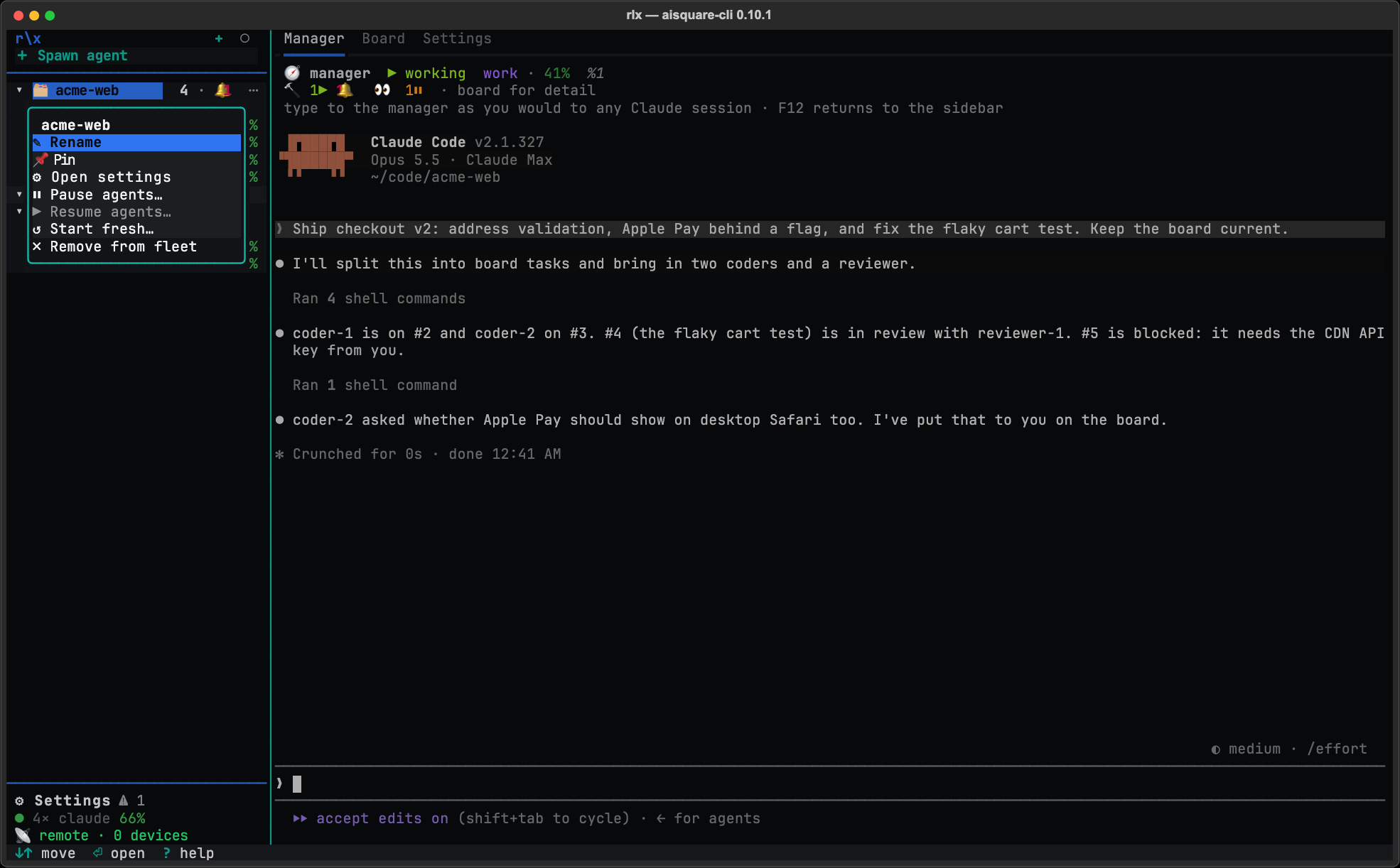
Open Start fresh…
Open the project card's ⋯ menu (or press . on the card, or right-click
it) and choose ↺ Start fresh…. The same button is on the project's
Settings tab.
Read the plan
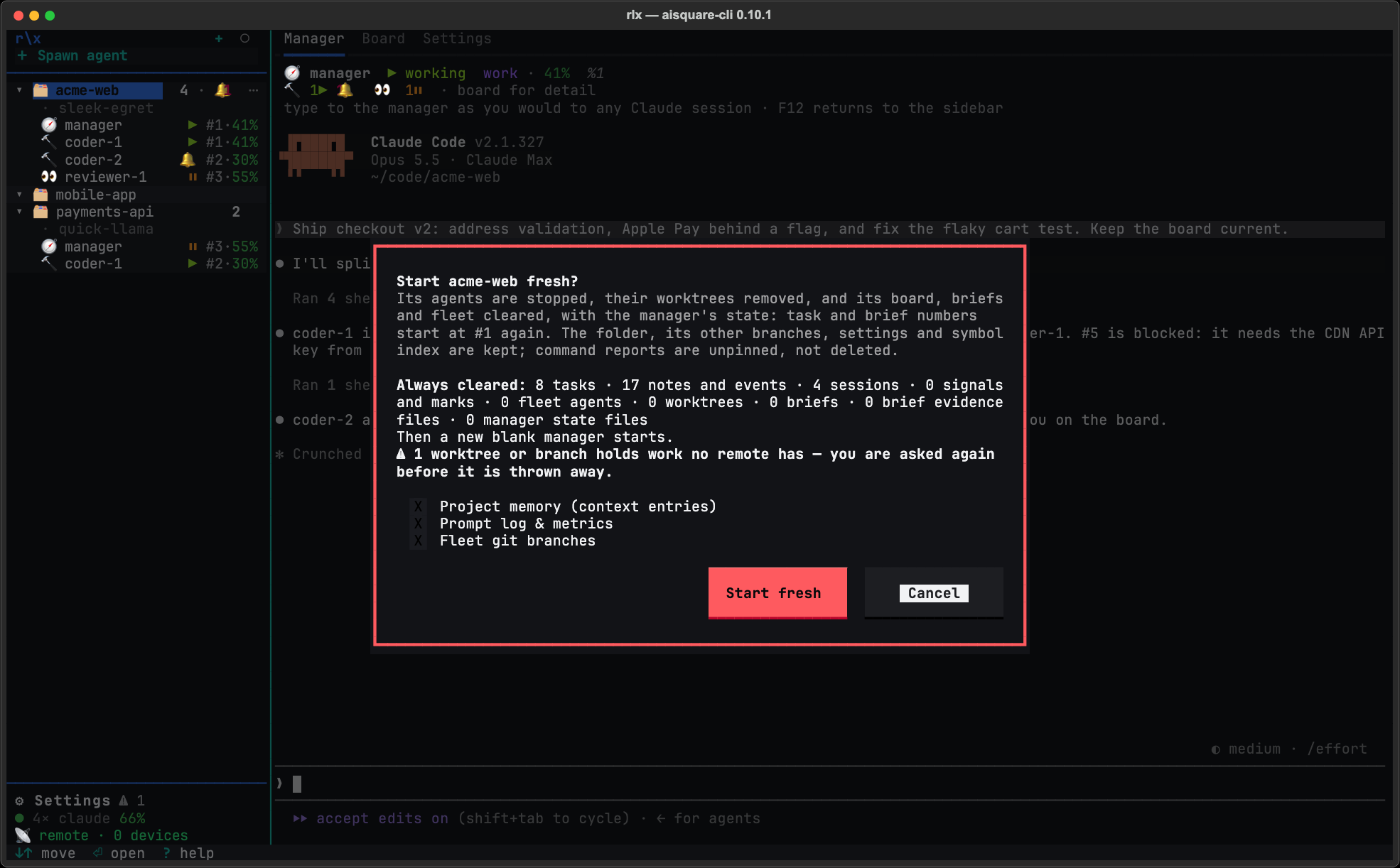
The dialog reads the project and counts what goes: under Always cleared, the tasks, notes and events, sessions, signals and marks, fleet agents, worktrees, briefs, brief evidence files and manager state files; the agents it stops first and the tmux session it ends; and Then a new blank manager starts. Under it are three boxes, all unticked: Project memory (context entries), Prompt log & metrics and Fleet git branches. Tick one and the plan adds its count under Also cleared.
Cancel has the focus, and Esc cancels. If the project cannot be started fresh right now, the dialog says why and Start fresh stays greyed.
Confirm, or keep unpushed work
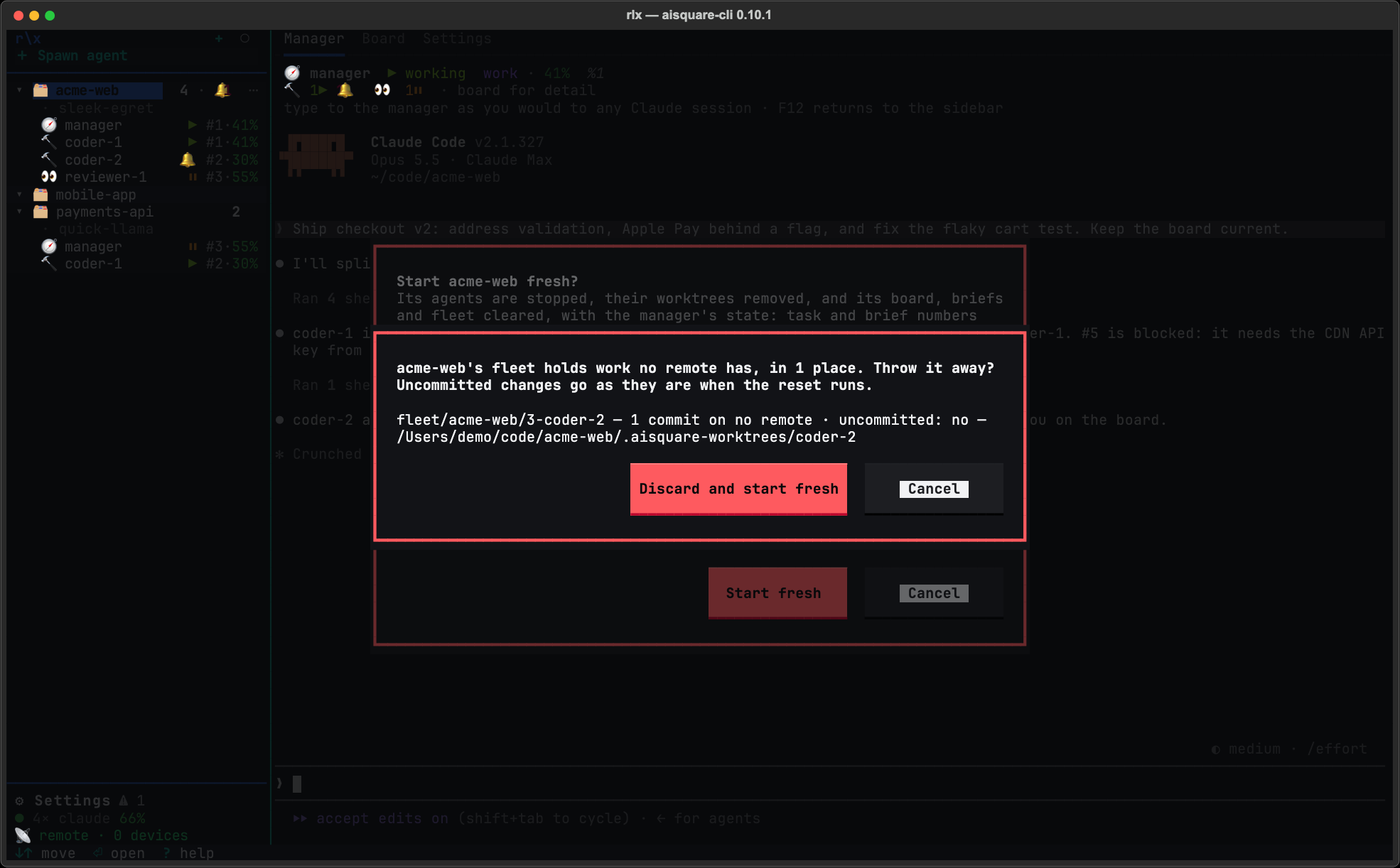
Press Start fresh. If a worktree or branch it would remove holds work no remote has (uncommitted changes, or commits nobody pushed), a second dialog lists each one with its branch and what it holds. Discard and start fresh throws that work away; Cancel goes back with nothing done, so you can push it first.
Check the toast
The reset runs in the background; a project runs one reset at a time, and other projects can reset meanwhile. When it ends, a toast
says what was cleared and that a new manager started, for example
✓ api started fresh — cleared 12 tasks, 41 notes and events, …; its tmux session ended; a new manager started (session 3fa9c2d1). Anything it kept
gets a warning toast of its own, with the reason. The project's board reads again from its start, and the new manager
is in the sidebar.
From a shell
rlx project fresh --dry-run              # print the plan, change nothing
rlx project fresh                        # print the plan and ask; then start fresh
rlx project fresh --memory --branches    # also clear its memory and its local fleet branches
rlx project fresh --project api --yes    # another project, without asking
rlx project reset # the same command, by its other name| Option | What it does |
|---|---|
--project, -P | The project, by name, codename, id prefix, nickname or path. Default: the active project. |
--memory | Also clear its context entries. |
--prompts | Also clear its prompt log and turn metrics. |
--branches | Also delete the local fleet/<codename>/… branches its agents made, never a remote one. |
--discard-unpushed | Throw away work its worktrees and branches hold that no remote has. Without it, such work refuses the reset and is named. |
--dry-run | Print what it would clear and change nothing. |
--yes, -y | Start fresh without asking. Off a terminal it is a dry run without it. |
At a terminal it prints the plan and asks, and asks a second time before
discarding anything. A discard at a terminal covers only the work the plan
listed and you confirmed; work that turns up after you confirm refuses the
reset. With --yes, --discard-unpushed covers whatever the run finds.
rlx --json project fresh prints the plan, and with --yes the counts it
planned and the counts it cleared. Events the stop itself writes are counted
apart: 11 notes and events (4 written during the reset).
When it refuses
Start fresh is refused, with nothing changed, when:
- the folder is not a project you added, or is the
~/.aisquarehome itself; - it runs from inside one of the project's own fleet agents, or from inside the
fleet's tmux server while there is something to stop (run it from
rlxor a terminal of your own); - another project's fleet agents read this project's board;
- a worktree or branch holds work no remote has, and you did not agree to discard it;
- tmux cannot say whether the project's session is still running.
A reset that stops part-way, because an agent or a tmux session would not
stop, clears nothing on the board and starts no manager. It names the next step
(rlx fleet shutdown) and prints what it did.
On a small terminal
At 80×24, the plan in the dialog scrolls when there are six or more agents, a box ticked, or unpushed work, so its last lines sit below the fold. Scroll the plan, or make the terminal taller.
See where your usage goes
See in rlx what every Claude Code session on this machine spent, by day, repository, account and model; how much room your accounts have left; your usage inside Claude Code's own status line; and the opt-in, off-by-default anonymous sharing.
Adopt a conversation you started by hand
Bring a Claude Code conversation you started in a terminal into the fleet. It resumes as a fleet agent on its own account and in its own directory, keeping its session id, so you can watch it in rlx and the manager can steer it.