

Overview
rlx is a manager for your AI coding agents: Claude Code and Codex. One terminal over your projects. Tell a manager what you want in plain words, and it runs the coders, testers and reviewers for you.
rlx is a manager for your AI
coding agents: Claude Code and Codex. It gives you one terminal over every
project you work on and every coding agent working on them. You tell a
manager agent what you want, in plain words. It turns that into numbered
tasks, starts coders, testers and reviewers to do them, checks their work, and
tells you when the result is ready for you to merge. Its command is rlx;
relax, asq and aisquare start it too.
Three things set it apart:
- A team, not a chat. The manager runs real Claude Code and Codex sessions. Click any agent and you are typing into its own session, exactly as the agent draws it.
- Usage limits stop being your problem. Add your other accounts once, for each agent. New agents start on an account with room, an agent that hits its limit moves to another account and picks up its own session where it left off, and one number in the sidebar says how much room the fleet has left.
- It is yours. MIT licensed and local-first: one command and one SQLite file on your machine, with the fleet a tap away on your phone when you step out.
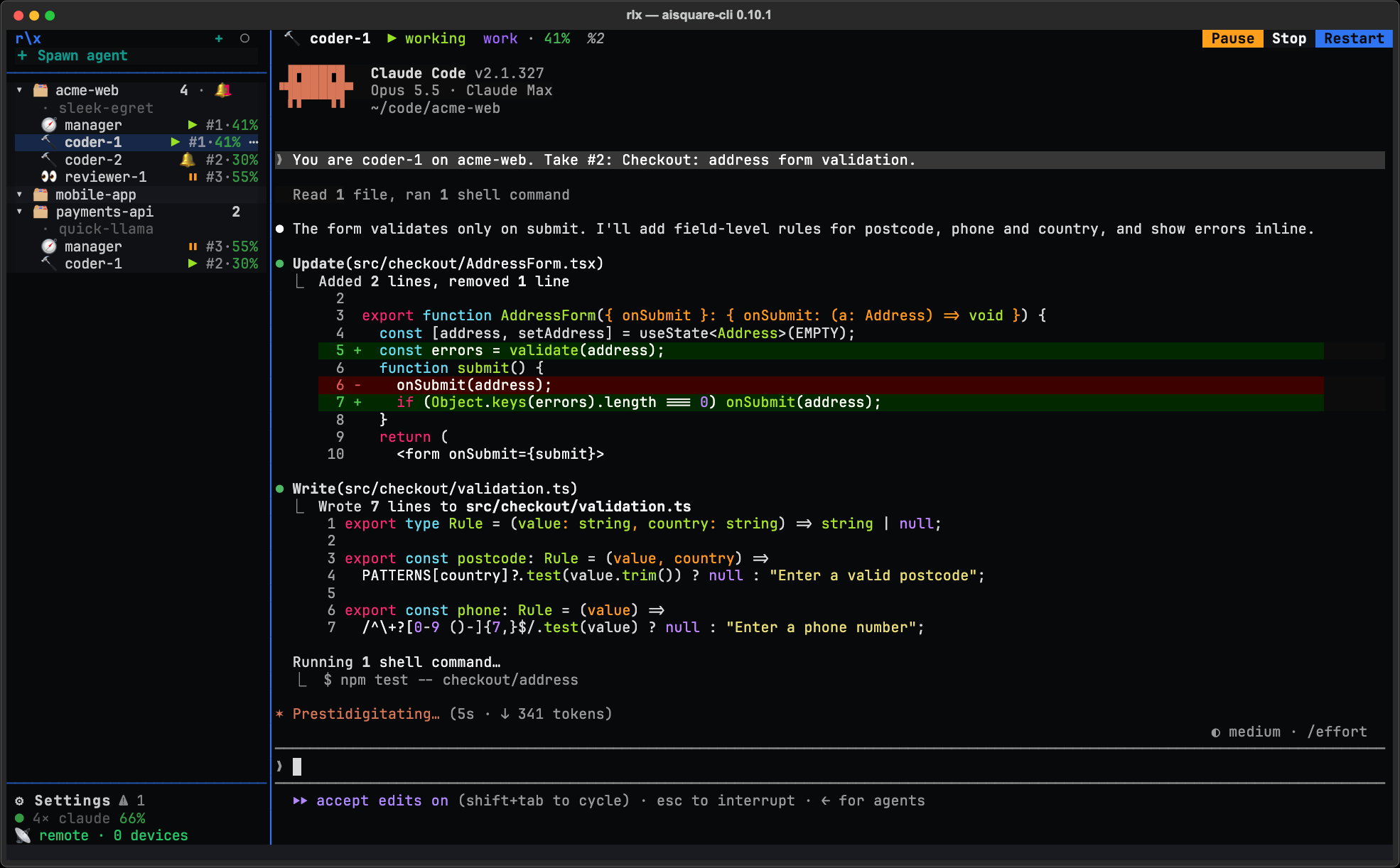
These pages document release 0.10.1.
Why it is worth installing
A manager that plans and runs the team
Brief the manager the way you would brief a tech lead: "add CSV export to the reports page, with tests". It writes each piece of work as a task with acceptance criteria, starts coders in their own git worktrees, sends a tester to try to break each change, a ui-tester to check anything a user sees in a real browser, and a reviewer to read the pull request. What fails goes back with the reason. When everything passes, it posts the pull requests and the evidence. It never writes code itself and never merges: that stays your call.
Every agent is a real Claude Code session in a private tmux server, not a
conversation relayed through a chat window. Close rlx and the agents keep
working; open it again and it picks them back up. Each one runs the model and
effort you last picked with /model and /effort, and can be spawned as a
persona, such as a skeptic or a
minimalist. See Run a fleet and
Tour of rlx.
Agents that do not stall on a usage limit
A busy fleet can use up a Claude plan's five-hour window well before the work is done. Add your other Claude accounts in ⚙ Settings ▸ Accounts and rlx manages them as one pool:
- Launches go where there is room. Each new agent starts on the first account, in the order you set, that is under the line (85 % used by default) on both its five-hour and weekly windows.
- An agent that hits its limit moves. It is restarted on an account with room, in the same worktree, resuming its own Claude Code session with its tasks still claimed. Unless the limit resets within 15 minutes anyway, it happens on its own. Opt in, and an agent can move at a turn end before its account runs out.
- Folder trust follows it. A folder you trusted on one account is trusted on all of them, so a moved agent does not stop at Claude Code's "trust this folder?" question.
See Connect more than one Claude account and Accounts and usage.
See where your usage goes
⚙ Settings ▸ Usage & stats breaks down every Claude Code session on your machine, launched by rlx or not, by day, repository, account and model: tokens, cost at list prices, sessions and turns. It all stays on your machine. See See where your usage goes.
One board the whole team works from
Every piece of work is a numbered task (#1, #2, ...) on the project's
board. When two agents reach for the same task, exactly one gets it. Work goes
to review before it counts as done, and a reopened task carries its reason
back to whoever picks it up next. The board's top line counts what needs you.
You can watch and drive it inside rlx or from any shell. See
The board and
Tasks and the work cycle.
The fleet on your phone
Turn on Remote and your fleet becomes a page on your phone, reached through your own ngrok tunnel and protected by a secret link and a password: one feed of what needs you across every project, each agent's live screen, and the board. It is read-only until you allow writes; then you can answer an agent or tell it something from wherever you are. A role can also start its agents with Claude Code's own Remote Control, to continue them from claude.ai/code; anyone signed in to the Claude account such an agent runs on can drive it. See Control the fleet remotely.
Memory, so every session starts oriented
Tell rlx once that you prefer pytest, or that this repo releases from a tag, and every new session starts knowing it. A symbol index answers where code is defined and used before an agent greps for it. Memory works on its own too, with no fleet at all. See Memory.
Local-first
Everything that runs on your machine (memory, the fleet, the board, Usage &
stats) is MIT licensed and needs no account. It is one command backed by one
SQLite file under ~/.aisquare: no cloud service. You sign in with
aisquare login only when a command needs to act as you on AISquare.
Parked
Session tracing to AISquare Explainability is parked since 0.9.1: see Tracing (parked).
Start here
Install
One line on macOS, Linux or WSL2, or by hand with uv.
Quickstart
From nothing to a manager and two coders working on your goal.
Tour of rlx
The sidebar, agent panes, Settings and the keys you will use every day.
Connect more than one Claude account
Several Claude accounts, one pool: launches go where there is room.
Permissions
How access to AISquare content is controlled and how to handle permissions correctly.
Install
Install rlx with one line on macOS, Linux or WSL2, pin a release with its own installer, or install by hand with uv. Check the machine with rlx doctor, update from rlx in one click, and remove it cleanly.