

Personas: pick, edit and import
Run any rlx agent as someone, such as a skeptic, a mentor or a minimalist. Pick a persona when you spawn, edit one in your own editor, import your own skills or plain text, and attach one to an agent that is already running.
A persona is how an agent works, written down once and given to it when it
starts: a skeptic that reproduces before it believes, a minimalist that makes
the smallest change that meets the contract. The role still decides what the
agent does. A coder running as skeptic is still a coder, with a coder's work
cycle and its task's contract.
A persona is a Claude Code skill: a directory named for the persona,
holding a SKILL.md, so there is no rlx format to learn. It is
--persona skeptic to the fleet; to use it as /skeptic in Claude Code too,
copy it into Claude Code's skills with rlx persona export skeptic --skill
(with --user or --project).
Where personas come from
rlx looks in three layers. When two hold the same name, the higher one wins.
| Layer | Where | Who sees it |
|---|---|---|
| project | <project>/.aisquare/personas/<name>/ | This project, and anyone who checks the repository out |
| user | ~/.aisquare/personas/<name>/ | You, in every project on this machine |
| bundled | inside rlx, read-only | Everyone |
The app shows your user personas and the bundled ones, the same in every
project, and writes only the user layer. A project's own personas are read and
written from a shell, with --project.
Four personas ship bundled:
| Persona | How it works |
|---|---|
careful | Prefers reversible steps, states assumptions before acting, and asks one precise question when blocked rather than guessing. |
mentor | Explains the why before the what, surfaces the alternatives it weighed, and leaves the reader able to do it next time. |
minimalist | The smallest change that meets the contract. No speculative abstraction; says what it left out and why. |
skeptic | Evidence first. Treats a green check as a claim, reproduces before believing, and names what it did not verify. |
An agent with a persona is briefed with the persona's body, then one sentence rlx adds: the persona shapes how the agent works and communicates, and never overrides its role's cycle, the lane rule, a task's contract or evidence. The body counts against every turn's context, so a body over 4,000 characters gets a warning and one over 12,000 is refused.
Run an agent as a persona
Open the Spawn dialog
In the sidebar, press + Spawn agent, and pick the Project, the Role and, if you want, the Account.
Pick a persona under Advanced
Open Advanced. The Persona select lists your personas and the bundled ones, with the chosen one's description under it. It opens on the role's own default, if the role has one; (none) runs the agent with no persona, even over a role default. Import… beside it imports a persona and selects it.
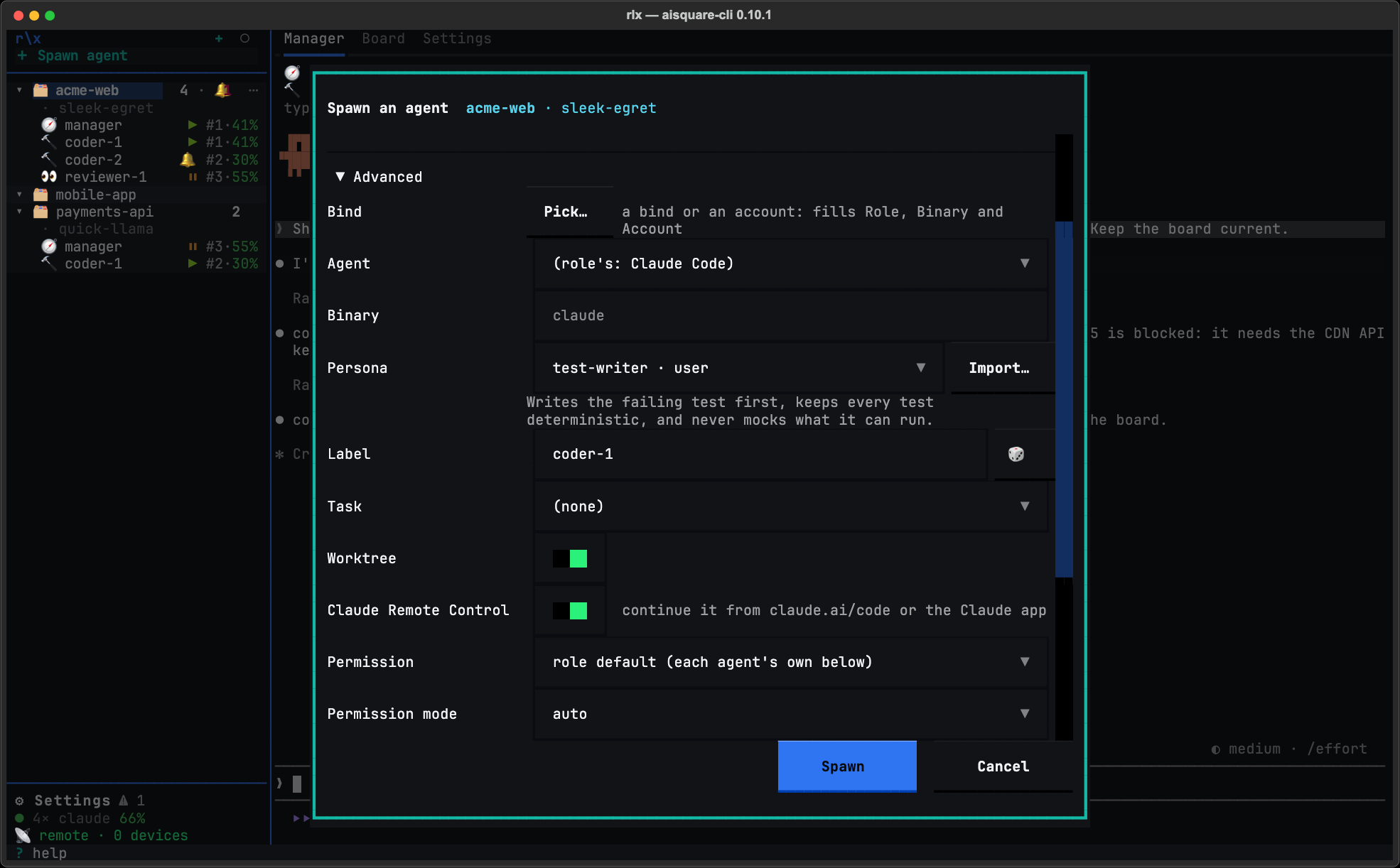
Spawn
Press Spawn. The agent's info line, at the top of its view, and its row in the sidebar show the persona it runs as. A restart or an account switch keeps it.
Give a role a default persona
To run every agent of a role as a persona, open ⚙ Settings ▸ App
settings, then Agent settings ▸ Advanced, and pick it in the role's
persona select. It lists your user personas and the bundled ones, which
every project can resolve; a project's own persona is given per spawn from a
shell, with --persona. Press Save.
From a shell, the same default is:
rlx config set fleet.roles.reviewer.persona skepticA spawn's own choice wins over the default. A default that a project cannot resolve refuses the spawn, naming the setting.
From a shell
rlx fleet spawn coder --persona minimalist --prompt "Start on #12"
rlx launch coder --persona skeptic       # a session you run by hand
Settings ▸ Personas
Your personas live in ⚙ Settings ▸ Personas, the same page for every project. Open ⚙ Settings at the bottom of the sidebar, then Personas.
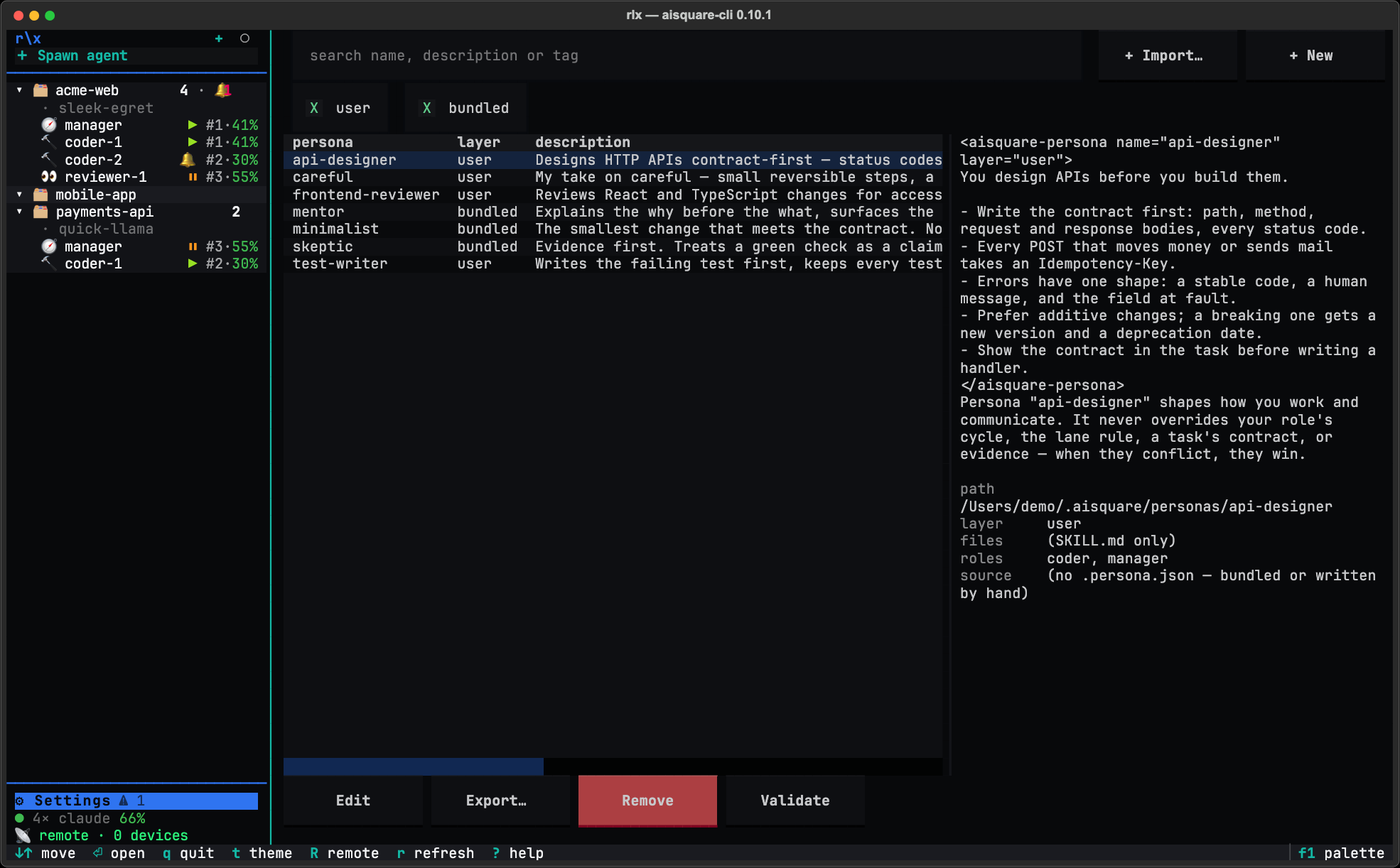
- Search by name, description or tag, and narrow the table with the user and bundled layer filters.
- The preview on the right shows exactly what an agent would be briefed with, for the selected row.
- Actions under the table: Edit, Export…, Remove and
Validate. With the keyboard on the page:
eedit,xexport,Delremove,vvalidate,iimport, andEnteropens the selected persona'sSKILL.md.
A bundled persona cannot be edited or removed in place. It opens read-only, with Save as… to copy it into your user layer, where you can change it.
Edit a persona in your own editor
Select it and press Edit
Select one of your personas and press Edit (or e).
Edit in the pane
Your editor opens in a pane in place: $VISUAL, else $EDITOR, else vi. It
works on a copy of the SKILL.md, never on the file itself.
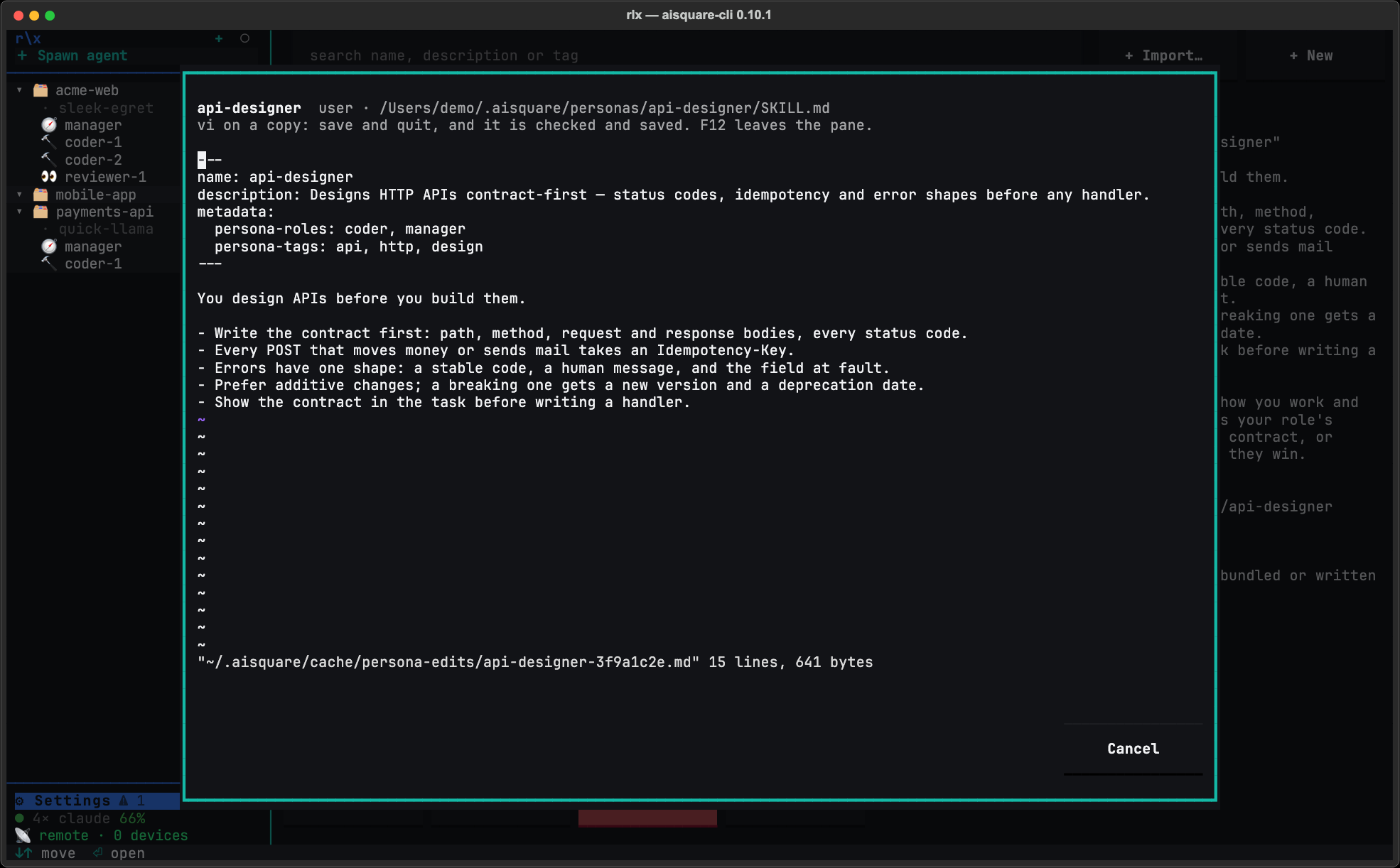
Save and quit
When you save and quit, the copy is checked and saved, and the table reads the layers again. A copy you did not change writes nothing. Text that does not parse is not saved: the dialog says why, and Reopen editor opens the same copy again, so nothing you typed is lost.
On Windows, on a machine without tmux, or with no editor to run, Edit opens
a text box inside rlx instead, with Save and Cancel.
Import a persona
+ Import… (or i) turns something you already have into a persona.
Name the source
In Source, give a skill directory, a SKILL.md, a Markdown file, or the
name of a Claude Code skill; Browse skills lists the skills Claude Code
already has. The Layer is user, the one the app writes, and the Name
is optional.
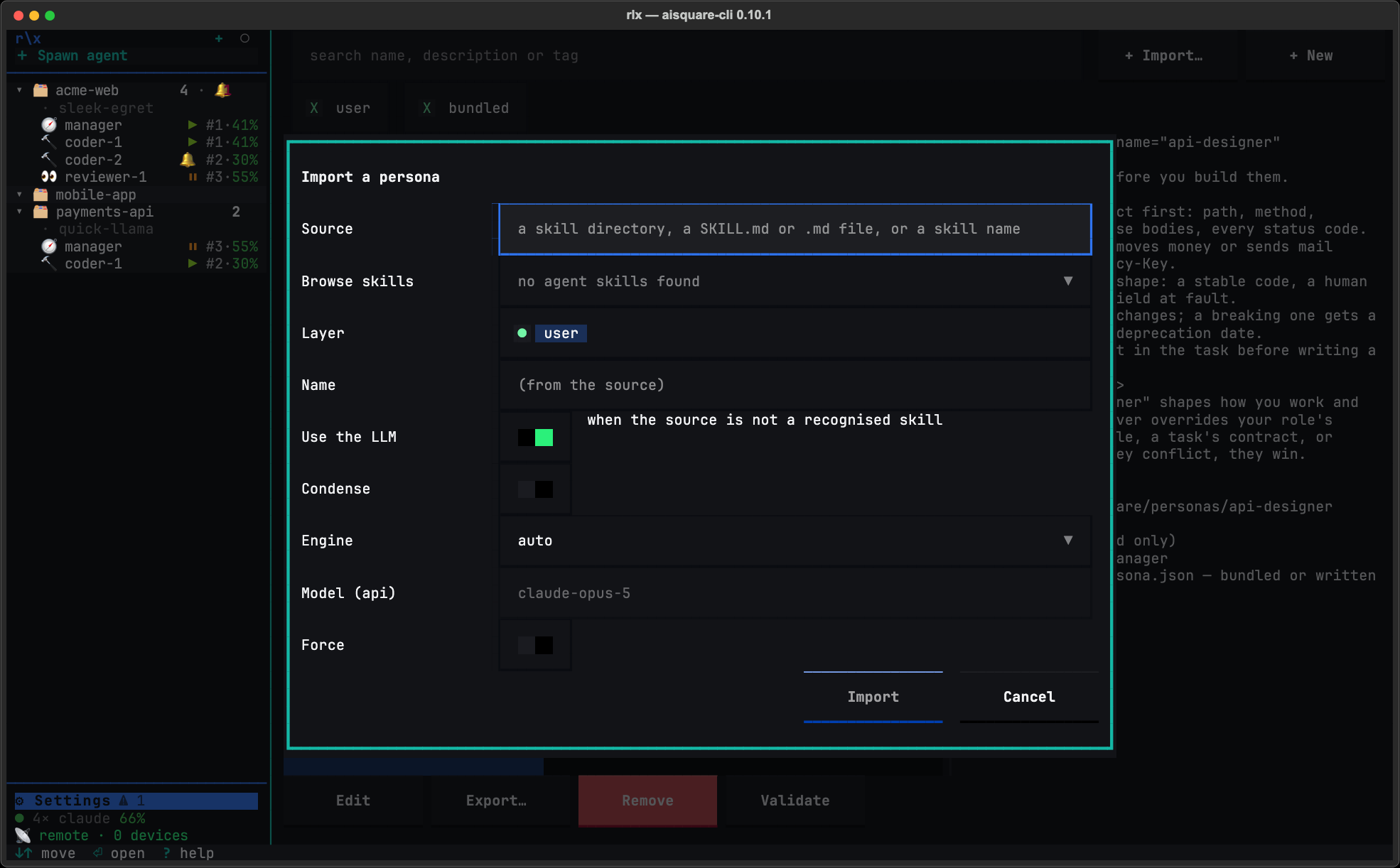
Import
Press Import. A Claude Code skill is copied in byte for byte. Anything else
(plain text, another tool's persona) is converted into a skill by an LLM
engine: by default headless Claude Code, else the Anthropic API when the llm
extra is installed. Use the LLM, on by default, allows that conversion;
switched off, nothing spends a token and a source that is not a skill is
refused. Condense rewrites the body shorter.
Check the draft, then save it
A converted persona is shown to you before it is saved. Save keeps it;
Discard saves nothing, though the draft stays under
~/.aisquare/personas/.drafts/<name>/, where
rlx persona import ~/.aisquare/personas/.drafts/<name> can take it
up again. Cancel while an engine is still working
stops it within a couple of seconds.
+ New makes a persona from a template: give it a name (lowercase letters, digits and single hyphens) and a one-line description, and press Create; it goes in your user layer, and the editor opens on it next. Export… copies a persona into a coding agent's personal skills (Claude Code's or Codex's), or a directory of your choice.
Give an agent a persona
To start a new agent as a persona, pick it in the Spawn dialog under Advanced ▸ Persona (above).
To give one to an agent that is already running, use a shell:
rlx persona attach mentor --to coder-authAn agent waiting at its prompt is briefed now; a busy one gets the persona
privately with its next prompt. It stays on the agent's record, so a /clear
or a restart briefs it again.
From a shell
Every action has a command. --user and --project choose the layer where
one applies.
| Command | What it does |
|---|---|
persona list | Every persona in every layer, and any directory that did not load, with why. --tag filters. |
persona show <name> | Exactly what a session would be briefed with, then where it came from and its files. |
persona new <name> | Make one from the template and open it in $EDITOR (the user layer by default). |
persona edit <name> | Edit a project or user persona in $EDITOR; text that does not parse is not saved. |
persona rm <name> | Remove a project or user persona. |
persona validate <path> | Check a directory against the persona rules: errors exit 1, warnings do not. |
persona import <source>… | Import one or more sources (see below). |
persona export <name> | Print the SKILL.md, or write the directory elsewhere (--to DIR), or into Claude Code's skills (--skill). |
persona attach <name> --to <label> | Give a running fleet agent a persona. |
rlx persona list
rlx persona show skeptic
rlx persona import ./my-skills/reviewer-voice              # a skill: copied as it is
rlx persona import notes/tone.md https://example.com/persona.md --project
rlx persona import --from-dir ~/team-skills                 # every skill and text file in it
rlx persona attach mentor --to coder-auth
persona import takes a skill directory, a SKILL.md or any text file, -
for stdin, an https:// URL, or the name of a Claude Code skill (--list
shows those). Give it several sources, or --from-dir DIR, and it imports them
one after another into one table of results (source, name, engine, outcome):
one refusal does not stop the rest, and the command exits 1 if any was
refused. --from-dir lists a README, LICENSE or CHANGELOG beside your skills
as skipped and spends no engine on it. --name names a single import, --llm
or --no-llm forces or forbids the conversion, --engine picks auto (the
default), manager, api or off, and --yes saves a draft without asking. Ctrl-C stops the
import and any engine it started, writes nothing, and exits 130.
Connect more than one Claude account
Add your other Claude accounts in rlx so the fleet uses them as one pool. New agents start on an account with room, and an agent that hits its usage limit moves to another account and carries on.
See where your usage goes
See in rlx what every Claude Code session on this machine spent, by day, repository, account and model; how much room your accounts have left; your usage inside Claude Code's own status line; and the opt-in, off-by-default anonymous sharing.