

Your fleet on your phone
Step away from the desk and keep your rlx fleet moving. See what needs you across every project, watch any agent live, and answer it from your phone, through your own tunnel and read-only until you allow more.
A fleet does not stop needing you when you leave the desk. An agent asks for
permission, the manager has a question, an account hits its usage limit. With
rlx remote, your phone shows one feed of everything waiting on you
across every project, each agent's live screen and conversation, and each
project's board. It notifies you when something new needs you, and, once you
allow it, lets you answer the prompt, tell an agent something, or stop,
restart or switch it.
This page is the reference for that phone remote. For the shortest path to turning it on, and for Claude Code's own Remote Control, which is a different thing, see Control the fleet remotely.
How it works
Remote is one small web server on your machine, bound to 127.0.0.1:8750 and
nothing else. Your phone reaches it through your own ngrok tunnel, so nothing
is hosted anywhere else, and the page the phone loads ships inside
rlx. Every address sits under a secret link (a 32-character random
token in the path, and a 404 for anything without it), and the page asks for a
four-word password once per browser (the phone page calls it the passphrase).
Out of the box everything is read-only: the phone can look at everything
and change nothing until you allow writes.
Through rlx there is nothing extra to install. The web server, Web Push and
ngrok itself (the official ngrok Python SDK, running inside rlx) come
with rlx, and the one setup step is giving it your ngrok token, once.
Running Remote without the fleet UI needs the ngrok command-line agent as well: see
Without the fleet UI.
What a phone can do
| Writes off (the default) | Writes on | |
|---|---|---|
| The Needs you feed, notifications, dismissing a card | ✓ | ✓ |
| Every project's fleet, board, tasks and memory | ✓ | ✓ |
| An agent's live screen and transcript | ✓ | ✓ |
| Sign this phone out, turn its notifications on or off | ✓ | ✓ |
| Type into an agent or press keys on the pad, quick answers on a card | ✓ | |
| Post a note on the board | ✓ | |
| Tell, stop, restart or switch an agent | ✓ | |
| Revoke another device, extend auto-off by an hour | ✓ |
Tasks and Memory stay read-only on the page even with writes on: the page offers no way to claim or finish a task, or add or remove a project. The server is wider than the page, though. With writes on, it accepts a task claim and done, a project switch, add or remove, a note, and keys typed into an agent from any unlocked device, so treat allowing writes as giving every signed-in phone those powers.
Set it up
Open Remote control
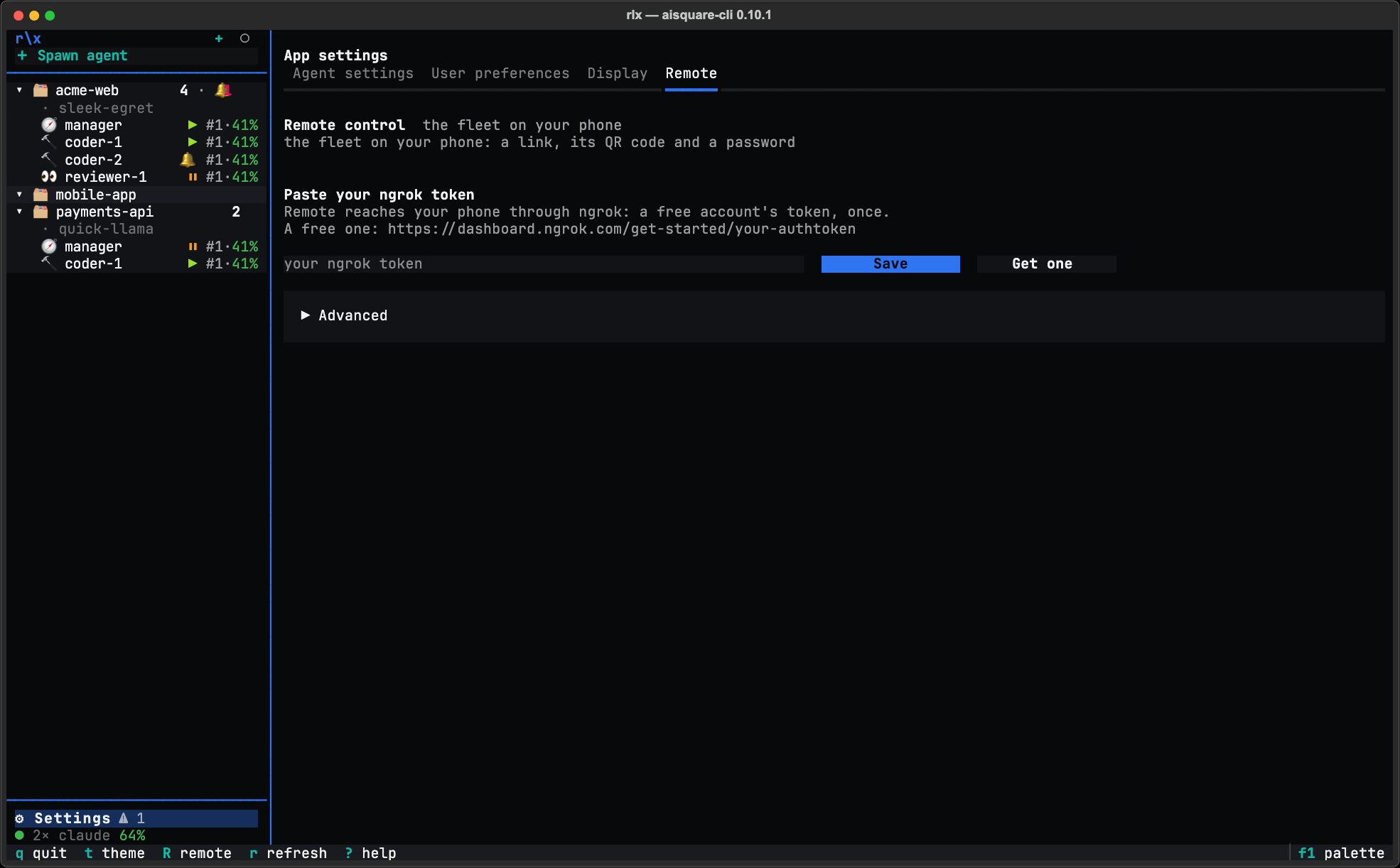
In rlx, open ⚙ Settings ▸ Remote control. It opens App settings on its
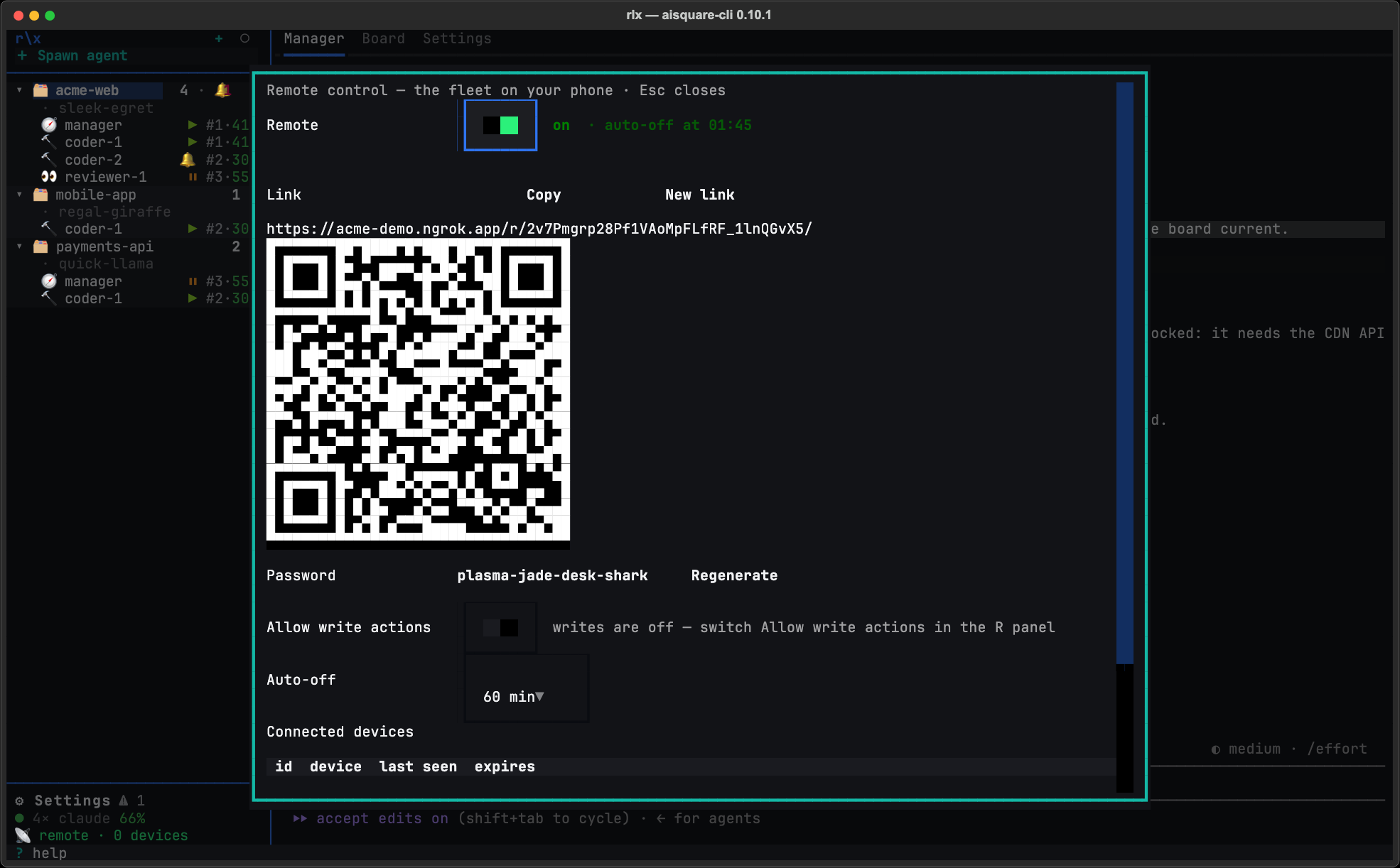
Remote tab. Pressing R in the sidebar opens the same Remote as a panel.
Paste your ngrok token
The first time, the tab asks for your ngrok token in place of Turn on remote
control. Copy it from your ngrok dashboard (a free account has one), paste it
under Paste your ngrok token and press Save. ngrok is asked whether it
takes the token: one it refuses is said beside the field and not kept. A kept
token is stored owner-only in ~/.aisquare/ngrok-authtoken and never shown
again.
If you already use ngrok, there may be nothing to paste. rlx takes the
first token it finds: NGROK_AUTHTOKEN in the environment you started rlx
from, then the token saved here, then the one in your own ngrok config.
Turn it on
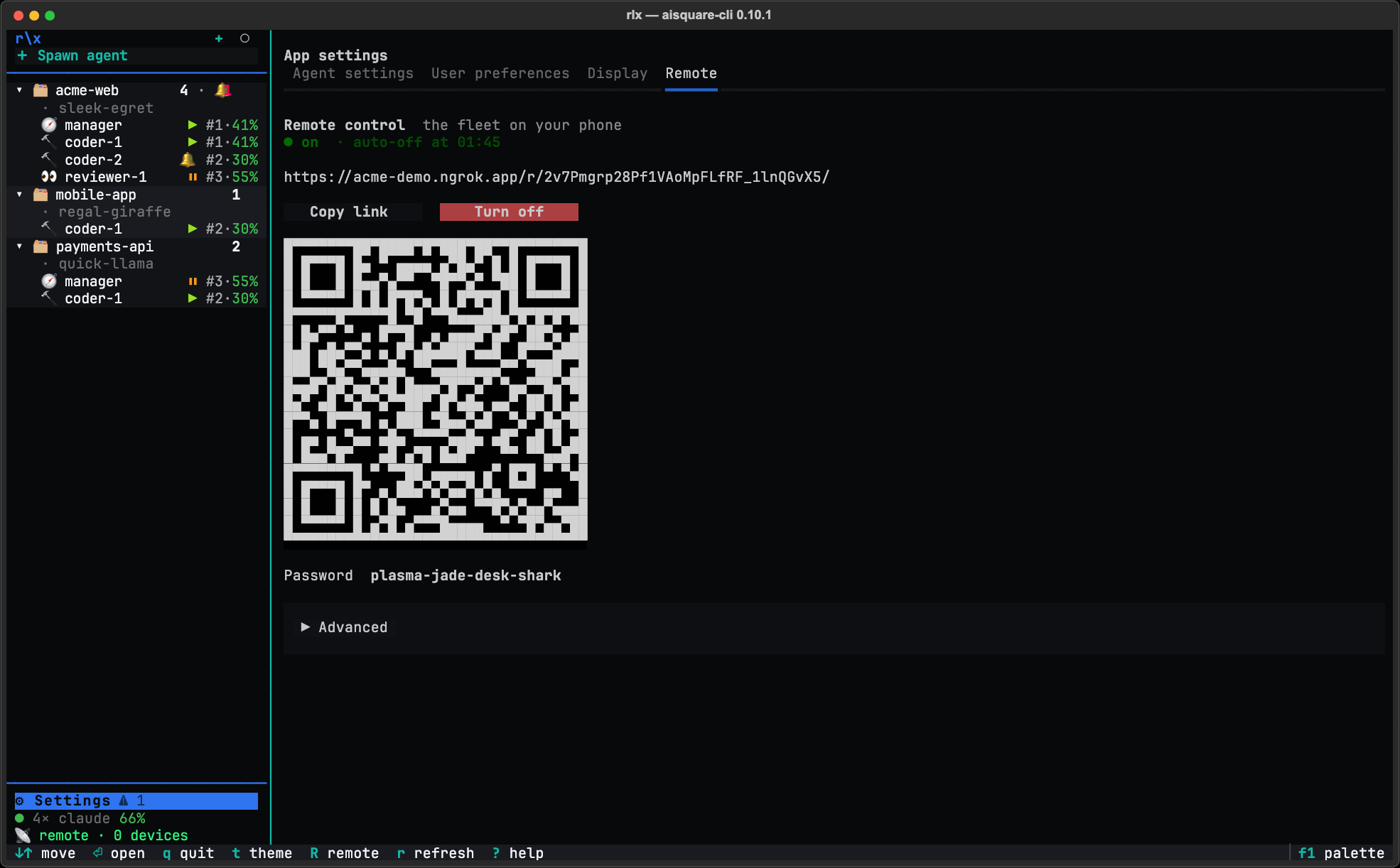
Press Turn on remote control. The tab starts the server and ngrok, copies the link for you once ngrok announces it, and shows the link, a QR code and the password. Scan the QR code with your phone and type the password (spaces, dashes or capitals are all fine).
Allow writes, if you want to act
Open the tab's Advanced and switch on Allow write actions. From a shell, the same switch is:
rlx remote allow-write onThe tab's Advanced, folded until you click it, holds the rest of the
controls: Change ngrok token, Regenerate password, Allow write
actions, the Auto-off timer (30, 60 or 120 minutes, or Never) and the
devices that have unlocked, with Revoke selected. The R panel has the
same controls but the ngrok token, over the same Remote: what one turns on,
the other shows on. It also has New link beside Copy: a new link and a
new password, so the old link stops opening and every device unlocks again.
While Remote is on, the sidebar shows 📡 remote · N devices, and a click on
it opens the panel.
If ngrok stops, rlx starts it again. A Remote that was on when rlx closed
comes back on at the next start (unless its auto-off time passed meanwhile),
always with writes off. If ngrok later refuses the token Remote signed in with,
the token field comes back as Replace your ngrok token.
Use a static domain
Every ngrok account has one free static domain. With it, the link, the phone's
sign-in and a Home Screen app survive restarts; without it, the address
changes every time ngrok starts and the phone has to unlock again. Name it in
the environment you start rlx from:
export AISQUARE_REMOTE_NGROK_URL=https://your-name.ngrok-free.appThe bundled ngrok then serves on that domain, and notifications link to it.
Without the fleet UI
rlx remote serve runs the server alone, until Ctrl-C or auto-off. It does
not start a tunnel, and the ngrok inside rlx is a Python library with no
ngrok command, so this route needs the
ngrok agent installed separately. The token you
pasted in rlx is kept in ~/.aisquare/ngrok-authtoken, which the agent does
not read, so sign it in once with ngrok config add-authtoken <token>. Then
run it beside serve, in a second terminal:
rlx remote serve --auto-off 120 --public-url https://your-name.ngrok-free.app
ngrok http --url=your-name.ngrok-free.app --inspect=false 127.0.0.1:8750
Give ngrok 127.0.0.1:8750, never 8750 alone: ngrok reads a bare port as
localhost, which is IPv6's ::1 first, where anyone on the machine could
listen and receive every phone's requests. Stop the ngrok when serve stops,
for the same reason; serve reminds you on its way out. On a machine others
use, also set web_addr: false in your ngrok.yml, so ngrok's local agent API
is off. Never run a second ngrok beside rlx's: a static domain holds one
tunnel.
Needs you
The Needs screen is one feed, across every project, of what is waiting on you, most urgent first. While a phone has the page open or notifications on, the machine checks every 3 seconds.
What counts as needing you:
- A permission prompt: an agent waits for you to allow a tool, such as a Bash command or an edit.
- A question with options, or a plan to approve.
- The manager asks, or reports a result, on the board. So does a coder, when no manager is there to take it.
- The manager is down: it crashed, was killed, or its replacement did not start.
- A crashed agent, while no manager is there to handle it.
- A usage limit, with Switch account on the card.
- A failed turn: an API error such as an expired login or credit that ran out.
- A lost pane, or tmux not answering for a project.
- A turn that ended with a question in plain text, or an agent you interrupted that waits for you.
Each card carries what you need to read before answering: the exact command or
file a permission is for, every question with its options, the plan. Under it
sits the bottom of the agent's live screen, so the real option labels are next
to the buttons. Quick answers are checked against the agent as it is right
now: if the prompt has already gone, or the screen shows a different prompt,
the card says No longer needs you and nothing is typed. Anything without a
quick answer (one of Claude Code's own dialogs, a form) is answered from the
agent's key pad. rlx remote needs prints the same list on the machine.
Notifications
On the phone, open Settings ▸ Turn on, then Send test to check the
whole path. A notification goes out when an item has stood for two scans, once
per item. Kinds that often clear by themselves wait a little first: a crash 30
seconds, a lost pane, a stopped manager or tmux not answering a minute, and an
interruption 10 minutes, since it follows your own Esc. A usage limit is never
pushed when it lifts within wait_if_reset_within_minutes, and waits 90
seconds when the fleet can switch the agent to another account by itself or a
live manager is on it.
A notification never holds anything from an agent. It is built from fixed
sentences (coder-auth asks you a question) with every name cut to 40
characters, plus a link to the card. No command, no question text, no excerpt.
The payload is encrypted to your browser's own key, so the push service sees
only that a message went.
- iPhone and iPad (iOS 16.4 or later): notifications work only from the page added to the Home Screen (Share ▸ Add to Home Screen) and opened from there. The Home Screen app has its own sign-in, so unlock it once more; it shows as a second device.
- Android, and desktop Chrome, Firefox and Edge need no install.
The machine also warns 10 minutes before auto-off, says goodbye when Remote is turned off, alerts you when someone is guessing the password, and warns a day before a phone's sign-in ends.
Act on an agent
Open an agent to see its Live screen (colours included) and its Transcript (the conversation, wrapped to the phone). With writes on, the input bar and key pad type into it, and its Actions… menu offers:
- Tell: one message, typed when the agent is waiting at its prompt, otherwise left as a board note it reads next. Interrupt & tell presses Esc first and types once the agent is back at its prompt.
- Stop, Restart and Switch account: each opens a sheet that says in one sentence what will happen. Restart and switch resume the agent's own session, and can take up to 40 seconds; the page waits and shows the result even if the phone slept meanwhile.
Safety rails are built into every action. Stopping types /exit and Enter,
and an Enter into an open dialog would answer it, so stop, restart and switch
are refused while the agent shows a prompt; the sheet offers Press Esc (No)
first. Every action is pinned to the agent you looked at: if the manager
restarted it meanwhile, the action is refused as stale rather than applied to
the replacement. Ctrl-C and Ctrl-D on the pad ask first, because Claude Code
exits on them. If nothing has arrived for 25 seconds, the page greys out and
holds every action until it is current again.
The board
Each project's Board shows its newest events first, with a composer for a note, a decision, a question or a result (a write). Fleet lists every agent and its state, and Tasks and Memory are read-only.
The security model
- A secret link. Every path is under
/r/<token>/, a 32-character random token. Anything else is a 404, so the address leaks nothing, and the page sends no referrer. - A password. Four distinct words from a list of 512, typed once per browser. Unlocking is limited to 5 attempts a minute per client and 20 failures in 30 minutes across everyone; past that, new unlocks pause and subscribed phones get an alert.
- Read-only by default. Every write is refused until you switch Allow
write actions on or run
rlx remote allow-write on, and a Remote thatrlxbrings back at its start always comes back with writes off. - Every write is audited in
~/.aisquare/remote-audit.log(owner-only), one line per write. Typed text is recorded as a length; a tell keeps its first 120 characters. - Auto-off.
serveturns Remote off after 60 minutes by default (--auto-off, a week at most,0for never);rlxoffers 30, 60 or 120 minutes, or Never. With writes on, a phone can extend it an hour at a time, up to 8 hours ahead.rlx's Turn off and auto-off sign every phone out. Ctrl-C onrlx remote serve, or quittingrlx, signs none out: each phone stays signed in until its own expiry and gets straight back in at the nextserveon the same link. To cut phones off, runrlx remote revoke --all. - Devices. Each browser that unlocks is a device: signed in for 7 days, and
signed out after 24 hours unused.
rlx remote statuslists them;rlx remote revoke <id>drops one,--alldrops every one. - A leaked link or password. In the
Rpanel, New link replaces the link and the password, so the old link stops working everywhere and every device unlocks again; Regenerate, beside the password, replaces the password alone. From a shell,rlx remote regenerate-passwordmakes a new password and signs every device out, and--new-linkalso replaces the link. - Nothing from another origin. ngrok carries the traffic and, for an HTTP
endpoint, terminates its TLS. Beyond that, the page loads nothing from another origin and is served
with a strict Content-Security-Policy and no framing. Every write and live
connection must come from the page's own origin. The ngrok inside rlx
has no traffic inspector and no local agent API, so nothing on the machine
can read or drive the tunnel; a hand-started ngrok needs
--inspect=falsefor the same reason.
Commands
| Command | What it does |
|---|---|
rlx remote serve | Run Remote without the fleet UI until Ctrl-C or auto-off. --port (default 8750, AISQUARE_REMOTE_PORT), --auto-off MINUTES (default 60, 0 never, AISQUARE_REMOTE_AUTO_OFF), --public-url URL (the https address for links in notifications, AISQUARE_REMOTE_NGROK_URL), --dist DIR (serve another build of the page). |
rlx remote status | Whether Remote is on for this machine, the link, the password, the devices and failed unlocks. --port for the link of a serve on another port. |
rlx remote allow-write on / off | Turn the write actions on or off, for the running server and the next one. |
rlx remote regenerate-password | A new password; every device unlocks again. --new-link also replaces the link; --port as for status. |
rlx remote revoke <device-id> | Sign one device out; --all signs every device out and leaves Remote on. |
rlx remote needs | What needs you right now, across every project, as the phone's feed shows it. |
rlx remote install-page <dist> | Install another build of the page over the bundled one (it lands in ~/.aisquare/remote-dist). |
The reporting commands take the global --json (rlx --json remote needs).
Troubleshooting
The tab keeps asking for a token, or says ngrok did not take it. ngrok
refused the token, or it was reset on ngrok's dashboard. Copy it again and
paste it under Replace your ngrok token (or Advanced ▸ Change ngrok
token). While NGROK_AUTHTOKEN is set in the environment rlx started
from, ngrok signs in with that one instead, and a line under the field says so.
The phone shows ngrok's warning page, or notifications will not turn on. ngrok's free plan shows a warning before a tunnel's first page. Pass it, then reload once.
Every write says bad_origin. Something between the phone and the server
rewrote the Host header, as ngrok's --host-header=rewrite does. Start ngrok
without it.
serve, or the Remote tab, says another Remote is on. One ~/.aisquare
serves one Remote: another rlx or a serve in another shell has it. Turn
that one off, or use it.
serve says the port is in use. Something else took 8750. Pass --port
and give ngrok, and status, the same port.
A hand-started ngrok says --url is an unknown flag. That ngrok is too
old for static domains. Run ngrok update.
The page says Remote is off on the machine, or the link changed. Remote was turned off, auto-off passed, ngrok came back on a new address, or the link was regenerated. Turn it on again, or open the link the machine shows now.
rlx upgrade warns, or rlx uninstall refuses, while Remote is
on. They name the Remote that holds this machine. Turn it off first: an
upgrade would leave it running the old release, and an uninstall would leave it
running with nothing to turn it off.
You installed another page build and want the bundled one back.
rm -rf ~/.aisquare/remote-dist.
Launching sessions
Start a seat with rlx launch, and pin what it launches: binary, environment, extra arguments and account, bound once per role.
Memory
With rlx, every Claude Code session starts oriented. Your preferences and each project's conventions are handed to every new session, and a symbol index answers where code is defined and used. Works with or without the fleet.