

The board
The board in rlx is the team's shared working memory. What needs you in one line, who is working, every task with a number and a status icon, and a feed of everything the team decided and did.
Every project has one board, and every agent in the project works from it. The manager writes tasks there, coders claim them, testers and reviewers close or reopen them, and everyone posts decisions, questions and results as notes. Each agent reads a short summary of what its teammates did since its last turn, so nobody forwards anything by hand. For you, the board is the one place that answers "what is happening, and does anything need me?".
You can open it two ways:
- In
rlx, as a project's Board tab. - In any terminal, with
rlx board -w: the same board, full screen.rlx boardprints it once, andrlx --json boardprints it for a script.--project(-P) shows another project's board.
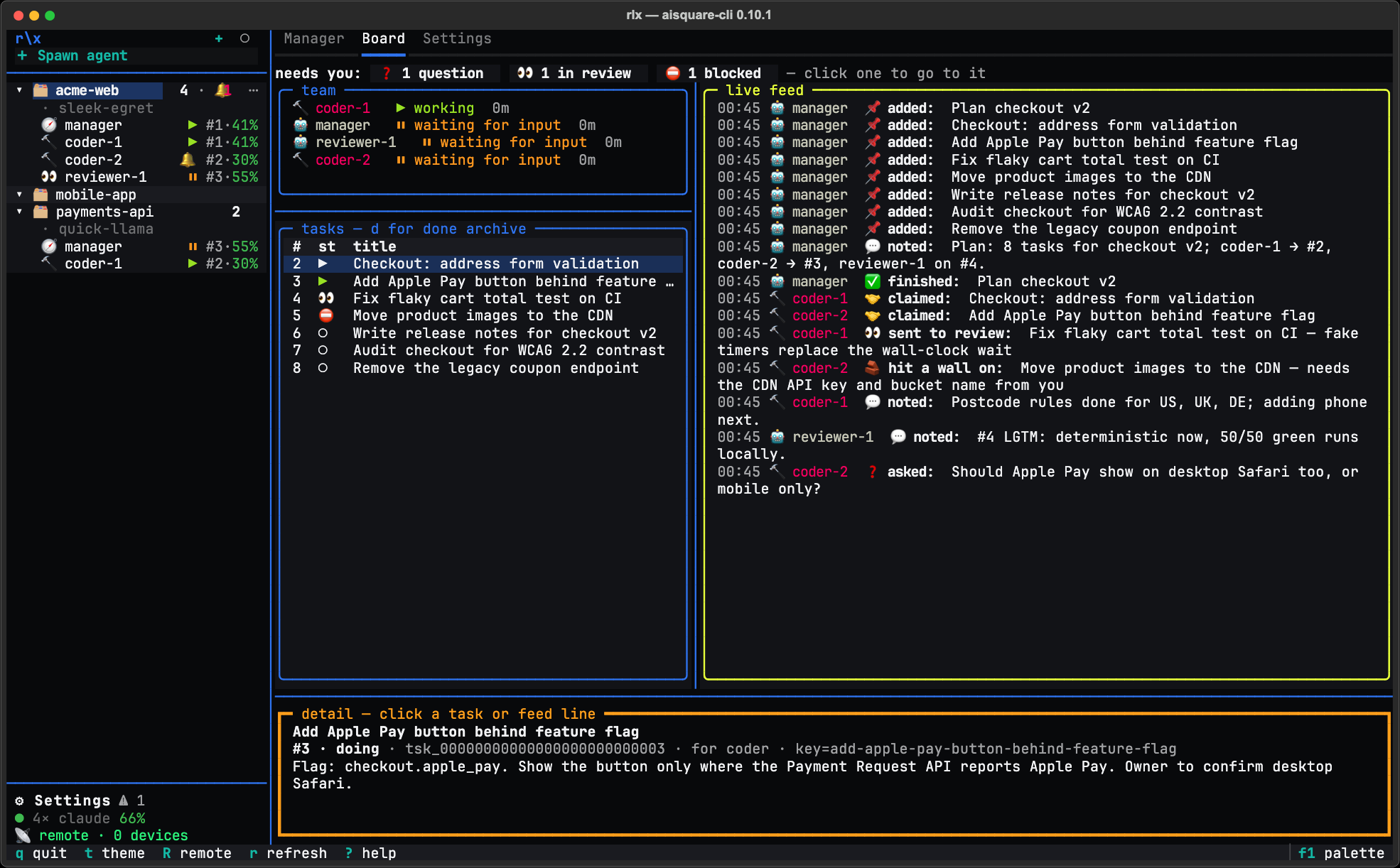
What needs you
The top line of the board counts what is waiting on you:
needs you: 🔔 1 waiting · ❓ 2 questions · 👀 1 in review · ⛔ 1 blocked — click one to go to it| Count | What it counts |
|---|---|
| 🔔 waiting | Agents stopped on you: a permission prompt, or a question at their prompt. |
| ❓ questions | Questions posted on the board for you to answer. |
| 👀 in review | Tasks in review that no check has passed or failed yet. |
| ⛔ blocked | Tasks parked on something. |
Each count is a button. A task count selects its first task in the table and
shows it in the detail pane; an agent count takes you to that agent's pane.
When nothing is waiting, the line reads nothing needs you — the manager is
working; talk to it on the Manager tab. On a narrow board it shortens to the
counts alone (🔔 1). It counts from what the board has already read, so it
adds no work of its own.
Who is here
The sessions block lists every live session on the board: its role icon, its
name as the sidebar shows it (such as coder-auth, or its role where it has
none), and a state chip. Of two sessions with one name, the live one, else
the newest, keeps the name, and each other adds the time it started, such as
coder-auth (14:02), or its short id when that time is shared too.
| Chip | Meaning |
|---|---|
| ▶ working | Mid-turn, doing something. |
| ⏸ waiting for input | Finished its turn and waits for its next prompt. |
| 🔔 NEEDS YOU | Waits on you: a permission prompt or a question. The terminal bell rings. |
| ⏳ limited | Parked on a usage limit, with the reset time. rlx board in a shell also names the rlx fleet switch <label> that moves it. |
| ⇄ switching accounts | Being moved to another Claude account. |
Beside the chip: the Claude account it runs on (once the board spans several),
its model, and how long since it was last seen. ⚠ off-ladder marks a model
that is neither its role's nor one you chose for it. A session silent for more
than 30 minutes is marked (stale). States come from Claude Code's lifecycle
hooks, so they follow the real session within a refresh.
Each agent is one session. An agent's own rlx serve --stdio (the board
tools over MCP) acts as that agent, so its notes and claims are its own and no
extra row appears. See Remote agents (MCP).
The tasks
Each task is one line: its number on this board (#1, #2, … in the order
tasks were added), a status icon, and the title, cut with … to fit, so
the table never scrolls sideways.
| Icon | Status |
|---|---|
| ○ | to do: nobody has it yet |
| ⧗ | to do, waiting on a task it needs |
| ▶ | doing: claimed and being worked on |
| 👀 | in review: waiting to be checked |
| ⛔ | blocked: the detail says on what |
| ✓ | done |
| ✗ | dropped: no longer worth doing |
With no open task, the table says where tasks come from: No open tasks. The manager writes them when you give it a goal on the Manager tab.
Click a task, or select it and press Enter, and the detail pane shows it in
full: its title, then a line such as
#12 · doing · tsk_… · claimed by <who> (lease until 14:05) · for coder,
then the tasks it needs (each with ✓ or ⧗) and its full contract. The number is
what you type in any task command: see
Tasks and the work cycle.
The feed
The feed is one line per board event, newest at the bottom: who (the agent's
name, in its role's colour, or you for a note you wrote from a shell), what
they did, and the content. Claims, reviews, reopens and
completions appear as they happen, alongside every note. Click a line for its
full, unclipped text, and press o to open the author's Claude Code
transcript at that exact moment.
Agents read each event as one short line, ending in rlx team show <seq>
when there is more. That command prints the event in full from any shell: who
wrote it, who caused it, the task, the addressee and the whole text.
Anyone can post to the feed, you included:
rlx note "JWT it is, not sessions" --kind decision
rlx note "Which database should the cache use?" --kind question --to manager
rlx note "Load test passes at 2k rps" --kind result --task 12
--kind is note, decision, question or result; --to addresses a role;
--task ties the note to a task.
Keys
Press ? on the board, in rlx or in board -w, for the keys, the icon
legend, and what you do here: answer a 🔔 or ❓ agent in its own pane, check a
👀 task on its pull request, and talk to the manager, because nothing on the
board is typed into.
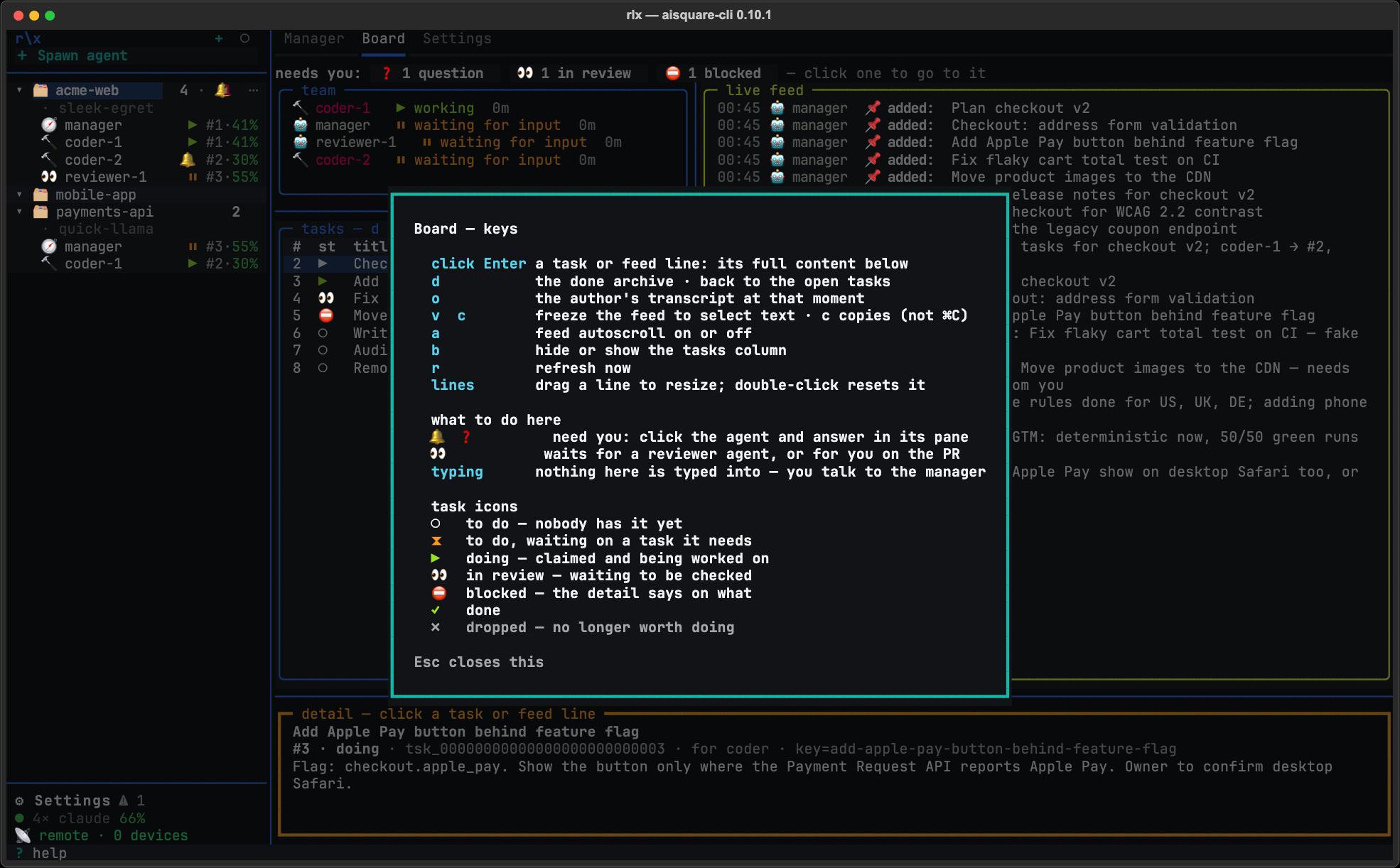
| Key | What it does |
|---|---|
? | The keys, the icon legend and what you do here. |
| click, Enter | Show a task or feed line in full in the detail pane. |
d | Flip the table to the done archive, newest first with the time each task closed, and back. Who closed it shows in the detail pane. |
o | Open the author's transcript at the selected moment, in $EDITOR or less. |
v, c | Freeze the feed to select text; copy the selection. On a Mac it is c, not ⌘C. |
a | Feed autoscroll on or off. |
b | Hide or show the tasks column. It hides by itself on a narrow screen. |
r | Refresh now. |
t, s, q | In board -w: pick a theme (applied live, saved), save an SVG screenshot to ~/.aisquare/screenshots/, quit. |
Every line drags to resize: the line beside the tasks column, the one above
the detail pane, and the one between the sessions and the tasks. A double-click
puts a line back. The sizes are saved in ~/.aisquare/state.json and shared by
every project's board, so they come back at the next launch.
Running a team by hand
The fleet is the way to run a team: one manager you talk to, agents it starts
and steers, all in rlx (see Run a fleet).
You can also run the roles yourself, one terminal each, with the board as the
only thing tying them together. The board, tasks and notes work exactly the
same.
cd your/repo
rlx team on                 # opt this project in to the board
rlx launch planner          # terminal 1: you talk to this one
rlx launch coder            # terminal 2, and as many more as you like
rlx launch runner           # verifies the coders' work
rlx board -w                # you, watching
rlx launch <role> registers the session and starts a coding agent with the
role's briefing and work cycle. The agent is the one --agent names
(claude-code or codex), else the role's binding, the account --account
names, or the project's rlx agents use <agent> --project, else the agent of
the first account with room in your priority order (Claude Code when all your
accounts are Claude's). Arguments after the role go to the agent. The roles
are planner (the manager's counterpart, without fleet authority),
coder, runner (what the fleet calls tester, which works here too),
reviewer, validator, ui-tester and manager. agent starts a plain
session of the agent on the board, with no role and no work cycle, and
--persona runs any of them as a persona.
Several Claude accounts work here too: rlx launch coder --account 2 runs
a coder on account 2, and a role can be bound to an account, or to a launch
profile of your own (rlx team bind coder --env …). See
Accounts and usage, and
Launching sessions for numbered
seats, bindings and which binary a role runs.
Projects
A project in rlx is a folder you add on purpose. Add it once, give it a name you recognise, arrange the sidebar so the work you care about is on top, and start it fresh when you reuse it.
Tasks and the work cycle
How work moves through the team in rlx. Numbered tasks that are safe to re-add, claims that exactly one agent wins, contracts printed to whoever claims, dependencies that hold work back until it is ready, and review feedback that finds its way back to whoever picks the task up next.