

Run a fleet
Tell one rlx manager what you want in plain words. It writes the tasks, staffs them with coders, testers and reviewers in their own worktrees, and tells you when the work is ready for you to merge.
A fleet is one manager per project plus the agents it spawns to do the
work. Every agent is a real Claude Code or Codex session, started in the
background in a private tmux server and shown live in rlx. You talk to the
manager the way you would talk to a tech lead. It turns your goal into tasks on the board,
starts the agents those tasks need, steers them, and reports back when a
validator has signed off. You review and merge.
Close rlx and every agent keeps running. Open it again and it re-attaches to
what it finds.
The roles
Each role is a briefing rlx gives the agent at launch, plus a place in the manager's loop. The icon is what you see beside the agent in the sidebar.
| Role | What it does | What it does not do | Runs in |
|---|---|---|---|
| 🧭 manager | Turns your goal into tasks with acceptance criteria, spawns the agents they need, steers them through the board, reopens what fails, calls the validator, and posts READY with the PRs and evidence. One per project. | Never writes code (a "fix this" becomes a coder) and never merges. | the repo root |
| 🔨 coder | Claims a task, implements it to its acceptance criteria, sends it to review, and takes the next one. It pushes and opens a PR when the task's contract asks for it; nothing in its own briefing does. | Does not sign off its own work: it self-checks, then sends the task to review. | its own git worktree |
| 🧪 tester | Spawned for one task once it is in review. Runs the full check the contract names, tries to break the change, then closes the task with evidence or reopens it with the reason, and stops. | Does not fix what it finds. | the repo root, so whoever spawns it names the branch to check |
| 🌐 ui-tester | Verifies tasks titled UI: … in a real browser (Claude in Chrome, the Chrome DevTools MCP or a Playwright MCP) and measures: screenshots, sizes, console, network. Launched with --chrome. | Never passes a task it could not open in a browser. It is asked not to edit or push, and nothing enforces that. | the repo root, so whoever spawns it names the branch and the URL |
| 👀 reviewer | Reads the PR as the stranger who will maintain it and posts findings with gh pr review. | Launched without the file-editing tools, and briefed never to push or merge. Its shell can still push, unless its credentials cannot: see A reviewer that cannot push. | its own git worktree |
| 🛡 validator | One final gate on the assembled deliverable, once every task is done and before the manager says READY. | Does not claim or work tasks. | the repo root |
There is also an agent with no role: (none) — general-purpose agent in
the Spawn dialog, or rlx fleet spawn agent. It is a plain session of its
agent, Claude Code or Codex, on the board, with no standing cycle and no
mission, for when you want a hand in the fleet without the manager's loop. Its icon is 🤖, as for
any role you define yourself with rlx team bind.
How the manager runs the loop
- Intake. It asks you questions until the acceptance criteria are something an agent can check.
- Contracts. It writes each piece of work as a task with an objective, the why, what is known, acceptance criteria and boundaries, and orders tasks that depend on each other. A coder's claim prints the contract, so nothing has to be retyped into a prompt.
- Staffing. It spawns one coder per task that can run in parallel, within
the agent cap. When a task reaches review it spawns one tester for that
task, a ui-tester for a
UI: …task (told which branch and URL to check), and a reviewer once a PR exists. - Steering. Board updates reach it one line each, and
rlx team show <seq>prints any of them in full. It reopens work with the reasons, nudges an agent withfleet tell, and re-specs or splits a task that keeps bouncing. Blocked twice on one task, it asks you: aquestionnote, counted on the Board'sneeds you:line. - Cleanup. Testers, reviewers, validators and ui-testers whose work is finished stop by themselves (see Finished workers stop by themselves). It stops the others, coders included, once their task is done and nothing queued fits them, and reaps them.
- The gate. Once every task is done it spawns the validator. On a PASS it
reaps again and posts
READY: <PRs + evidence>, then stops.
Then it is your turn: review the PRs and merge them.
The manager reaches its agents only through the board and fleet tell. It is
woken for decisions, not news. A task sent to review, done, blocked or
reopened, a result, a question, a usage limit the fleet will not move by
itself, a hand-over that failed, a first message an agent never took, anything
addressed to it, a failed or killed exit, an exit that left a claim open, or a hand-over that did
not start wakes it, with a one-line nudge typed into its pane while it is
waiting. A clean exit, a switch, a restart, a claim, a plain note, or a limit
the fleet is already moving to another account (the default
on_limit = switch) waits for its next wake. A nudge is never
typed over a draft you are writing in its pane: it goes out once the input box
is clear. When the manager stops with new board events pending, its Stop
hook lets it continue (at most max_continuations_per_hour times, 30 by
default). No model polls the fleet, and the loop works with rlx closed.
A manager starts from a start pack rather than the whole board: its state file, open tasks, questions, live agents and waiting events, in at most 20,000 characters.
rlx fleet pause stops a project's fleet without losing it: the manager
spawns nothing, and every running agent exits as fleet stop does, keeping its
label, task claim, worktree, account and session. rlx fleet resume starts
exactly those agents again, each with its session resumed. In rlx,
Pause agents… on a project and ⚙ Settings ▸ Fleet ▸ Pause all… do the
same, and Pause in an agent's view pauses that agent alone. When an agent
hits a usage limit, the fleet moves it itself; see
Accounts and usage.
Start an agent yourself
The manager staffs its own tasks, but you can start any agent by hand, in any project.
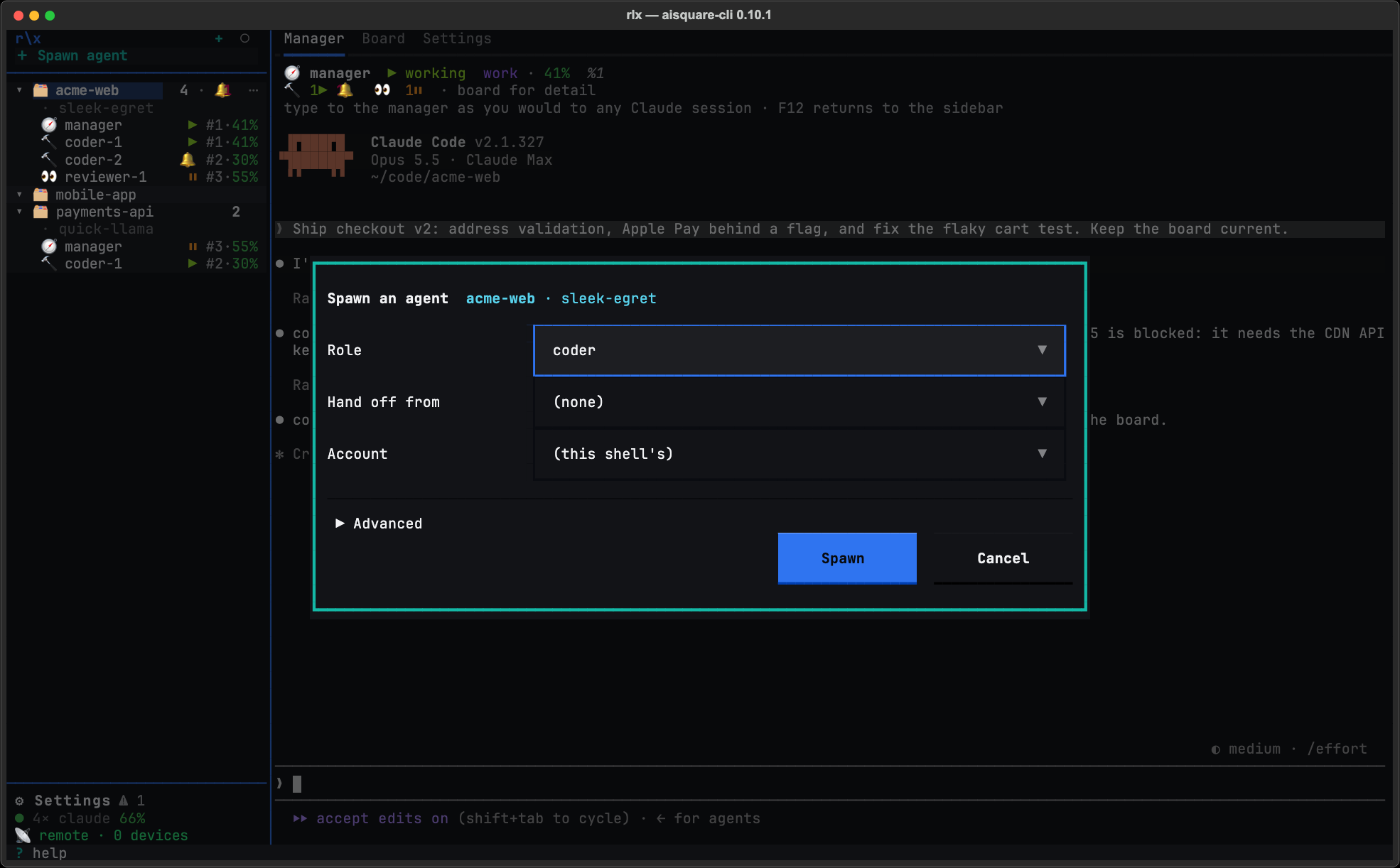
Fill the fields
- Project, at the top when you opened the dialog with + Spawn agent: where the agent goes. It starts on the card or agent you had selected, and changing it re-reads everything that depends on the project. A dialog opened for one project, as in the picture, has no Project field.
- Role:
coderby default, or any role above, or (none) — general-purpose agent. - Hand off from: (none) for a fresh agent, or a teammate to carry on from. Pick one and a How row appears: Fork leaves the teammate running and starts a new label in its own worktree cut at the teammate's commit, resuming its conversation; Take over stops the teammate after one question and takes its claims, task and worktree. Start fresh starts a new session instead of resuming either way.
- Account: which account it runs on. Left alone, it says what a
spawn with no account runs on and why, such as
(default: rank 1 · work)or(default: headroom · work). See How a launch picks an account.
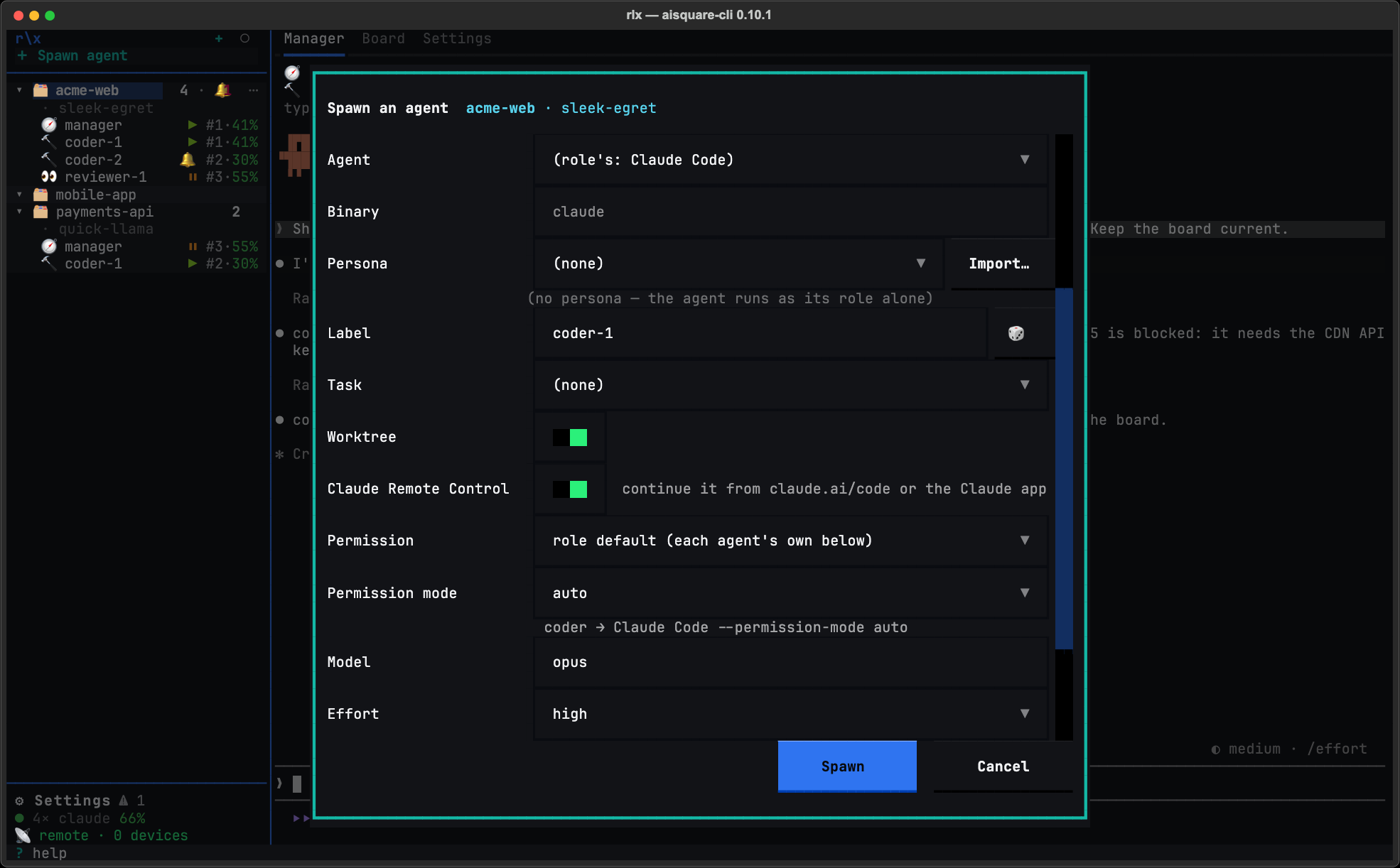
Open Advanced, if you need it
Everything else folds under Advanced: Pick… (fills Role, Binary and Account from a list of targets), Agent (Claude Code or Codex), Binary, Persona (with Import…), Label (🎲 rolls one), Task, Worktree, Claude Remote Control (Claude Code only), Permission with the agent's own controls (Permission mode for Claude Code, Sandbox and Approval for Codex), Model, Effort, Extra agent args and First prompt. A field you leave as it opened means "the role's default", exactly as an omitted command-line flag does.
Press Spawn
With Hand off from set, the button reads Fork or Take over instead. The agent appears under its project in the sidebar. A spawn cannot be taken back once it has started, so while it runs Cancel waits for its answer.
From a shell, the same spawn:
rlx fleet spawn coder --label coder-auth --task 12 --prompt "Start from the failing test"
rlx fleet spawn agent --prompt "Look at why the nightly build is slow"   # no role
rlx fleet spawn reviewer --account work
rlx fleet spawn coder --persona skeptic --model opus --effort high
Arguments after the options go to the agent, which is why --model and
--effort work here: they are Claude Code's own flags. It is also why the
global --json goes before the subcommand (rlx --json fleet spawn coder). Labels are 2 to 24 characters of lowercase letters, digits and -, starting
with a letter. A label already
taken by a live agent gets a -2 suffix, trimmed so the whole still fits, and
the receipt names the label actually used; a --label over 24 characters is
refused with one that fits.
Models and effort
A fleet agent runs the model and effort you last chose. rlx keeps one pick per home, for every role and persona, and only your own choices write it:
- a spawn of yours that names a model or effort, in its own arguments or the Spawn dialog's Model and Effort fields;
/modelor/effort(or/config▸ Model) that you run inside any fleet agent, which rlx reads from Claude Code's own record at the end of the turn.
When a spawn decides what to run, the first of these that says anything wins:
- The spawn's own
--modelor--effort(or the dialog's fields). - The role's settings:
[fleet.roles.<role>] extra_args, or a binding's--arg. These never write your pick. - Your last pick.
- Nothing at all, so Claude Code runs the account's own default.
So Fable, or max effort, runs only when you chose it. The dialog's Model
and Effort open on your last pick (or the role's pin, if it has one). A
cleared field forgets the pick and runs the account's default, except over a
role's pin: there the pin runs and the pick is kept.
A restart or a switch keeps what that agent was running. To run one agent on something else without moving your pick, restart it:
rlx fleet restart coder-auth --model opus --effort highAn agent cannot hand another a /model or /effort: an agent's fleet tell
that opens with one is refused in favour of that restart. Your own tell is not.
Change the model at the prompt
A /model typed while a turn is running is recorded nowhere by Claude Code,
so rlx cannot see it and a restart starts the previous model. Change the
model while the agent waits at its prompt.
rlx team harness shows each role's model ladder, which the board's
⚠ off-ladder chip compares an agent's model against. The chip stands down
for a model you chose.
First messages
A spawn's --prompt, a restart's line and a hand-off's reach the agent
reliably. A Claude Code agent gets its first message on its command line,
from a file only you can read that its launch deletes; any other binary has it
typed once its input box is drawn. fleet spawn, restart and switch wait
up to [fleet] prompt_ack_seconds (45) for the agent's turn to take it and
end with ✓ first message taken, or say it was not.
fleet spawn --task with no prompt tells the agent to start on its task.
Without either, the agent starts with its briefing and waits at its prompt.
On a shared machine
A first message on the command line can be read by other local users in ps
while the agent runs. rlx config set fleet.first_prompt type types it
instead, keeping it off the command line.
Nothing the fleet types lands in your draft. Every typed write (a nudge,
fleet tell, a typed first message, a phone's paste) reads the input box
first and holds off while it holds your text, or while you typed into that
pane in rlx in the last [fleet] draft_quiet_seconds (10). A held tell is
filed as a board note instead and says why.
Worktrees, and cleaning up after them
Each coder and reviewer works in its own git worktree, so parallel agents never
share a tree. The worktree lives at <repo>/.aisquare-worktrees/<label> (kept
out of git through .git/info/exclude) and shares the main checkout's board
and memory. Its branch is fleet/<codename>/<task-short-id>-<slug>, such as
fleet/amber-otter/01k9q8p3-wire-auth, or fleet/<codename>/<slug> for an
agent spawned without a task. A project that is not a git repository has no
worktrees, and a spawn that asks for one is refused.
rlx fleet reap cleans up after finished agents. It records agents whose
panes have died as ended (with their exit code) and agents whose panes have
vanished as lost, then:
- Removes the worktree of an ended agent once nothing in it exists only there: the tree is clean and its commits are on the default branch or pushed to any remote branch. A tree with uncommitted changes, an untracked file that is not ignored, or unpushed commits is kept and named, with the reason. Push it and the next reap removes it.
- Deletes the agent's
fleet/…branch once the default branch has its work, including after a squash or rebase merge of a pushed branch. A branch with commits the default branch lacks is kept and named on every reap, withgit -C <repo> branch -D <branch>to drop it once the work is abandoned. Reap never deletes a branch that no agent row recorded, or one a live agent is using.
The branch outlives the tree. A restart or switch of an agent whose tree was removed makes the tree again on the branch the agent was on, and a new coder spawned for the same task checks the same branch out and carries on with its commits.
You rarely need to run reap yourself: the manager reaps agents whose work is done, and reaps again after the validator passes. To clear a whole project's board and fleet at once, see Start a project fresh.
How many agents can run
A spawn is admitted against three limits, and a refusal names the numbers:
| Setting | Default | What it limits |
|---|---|---|
fleet.max_agents_per_project | auto | Live agents in one project, the manager included. auto has no fixed number: a spawn is admitted unless the machine is busy, and while it is, a spawn into a project that already runs fleet.busy_floor agents (3) is refused for a while. A whole number sets a fixed cap. |
fleet.max_agents_total | 0 (no budget) | Live agents across every project. |
fleet.min_free_mb | 2048 | The memory the machine must have free for a spawn to start. |
A spawn refused by the total or the memory floor first stops finished workers,
then tries once more. rlx fleet capacity shows memory and live agents
against each limit, and rlx fleet gate -- <command> waits for memory
headroom before it runs a heavy command such as a test suite.
max_agents_per_project is also in ⚙ Settings ▸ App settings; set any of
them from a shell:
rlx config set fleet.max_agents_per_project 6Finished workers stop by themselves
A tester, reviewer, validator or ui-tester that has finished is stopped by the
fleet, waking nobody. Finished means: its task is closed (or, spawned for
none, it posted a result), it holds no claim, nothing addressed to it is
waiting, nothing is queued that its cycle would take, its input box is empty,
and it has sat idle for [fleet] auto_stop_idle_minutes (5). Its exit reads
auto-stop. The manager is never stopped this way.
rlx config set fleet.auto_stop_finished false turns off the fleet's
own stops, but a running rlx watch still stops finished workers on
every look while [watch] auto_stop is on (the default):
rlx config set watch.auto_stop false turns that off too.
rlx fleet reap --finished does it on demand;
and --dry-run lists the candidates without stopping any.
One watcher, with no model
rlx watch is one plain process for the whole fleet. Every minute it
looks for agents at a dialog, a usage limit, a crash or a stall, and, with
[watch] github = true, each project's pull requests. When it finds something
new it puts one line on that project's board for the manager, with a count
and a file path, and nudges it. Nothing starts it for you:
rlx watch --detach runs it in a window of the fleet's tmux server,
rlx watch --status says whether one runs, and rlx watch --stop
stops it. The manager's briefing tells it to rely on the watcher rather than
spend its own turns polling panes, CI or pull requests.
Permission modes
An unattended fleet has to answer permission prompts. The default for every
role is Claude Code's auto mode: its classifier approves routine tool calls
and still stops for risky ones, which surface in rlx as 🔔 on the agent with
a terminal bell.
| Role | Default |
|---|---|
| manager, coder, tester, validator, (none) | auto |
| reviewer | auto, launched without Edit, Write and NotebookEdit, so it keeps its shell but cannot edit files with those tools |
| ui-tester | auto, plus --chrome from the role itself (--no-chrome turns it off) |
To change a mode, use one of three places. A per-spawn flag wins over config, and config wins over the built-in default.
rlx fleet spawn coder --permission-mode acceptEdits                 # one spawn
rlx config set fleet.roles.coder.permission_mode acceptEdits        # every coder from now on
rlx fleet restart coder-auth --permission-mode acceptEdits          # an agent already running
⚙ Settings ▸ App settings edits the same config per role, under Agent
settings ▸ Advanced. A restart replays the mode the agent was launched with,
so a role's new setting reaches only agents spawned after it; use
fleet restart --permission-mode for one that is already running. If auto
is not available to an account, the refusal appears in that agent's pane and
the spawn does not fall back, so pick another mode. bypassPermissions is
available and is never a default.
Tools a role launches without
Every fleet launch denies eight tools no role uses, such as Artifact,
Workflow and ScheduleWakeup ([fleet] deny_tools). The reviewer's deny of
the file-editing tools is its role's own, so it holds however the reviewer is
started. Per role, [fleet.roles.<role>] deny_tools adds to that,
allow_tools gives a tool back, and skill_listing (full, names or
off) sets how much of the skill list it sees: the manager gets the full
list, every other role names only. rlx doctor shows a <role> tools
row for each.
Claude Code Remote Control, per role
A role can start its agents with Claude Code's own Remote Control, so you can
continue that agent's session from claude.ai/code or the Claude app. It is off
for every role by default. Turn it on for a role with
rlx config set fleet.roles.coder.remote_control true, or for one agent
with fleet spawn --remote-control or the Spawn dialog's Claude Remote
Control switch. A restart and a switch keep the choice.
Anyone on that Claude account can drive it
A remote-controlled agent keeps its role's permission mode, and anyone signed
in to the Claude account it runs on can drive it. This is separate from
rlx remote, your own phone page.
rlx doctor shows a remote control row, only while a role has it on,
naming those roles and anything Claude Code would refuse. See
Control the fleet remotely.
A reviewer that cannot push
The reviewer keeps its shell, because gh pr diff, gh pr review and its
board cycle all need it. That means its briefing and auto mode's checks are
all that stand between a prompt injected through the PR it reads and a git push or gh pr merge. Credentials can refuse what a briefing cannot. This
setup is opt-in; without it, the reviewer uses whatever gh and git find.
Create a read-only token
On GitHub, create a fine-grained personal access token for the repositories the fleet reviews, with Contents: Read-only and Pull requests: Read and write. If its cycle reads CI, add Commit statuses and Actions, both read-only. Leave everything else out, above all Contents write, Administration and Workflows.
Keep it in a file only you can read
mkdir -p ~/.config/aisquare
(umask 077 && cat > ~/.config/aisquare/reviewer-gh-token)   # paste, then Ctrl-D
Bind it to the reviewer role
rlx team bind reviewer \
  --env-file GH_TOKEN='~/.config/aisquare/reviewer-gh-token' \
  --env-file GITHUB_TOKEN='~/.config/aisquare/reviewer-gh-token'
Every reviewer launch now reads the file into that session's environment alone:
fleet spawn, fleet restart, fleet switch and rlx launch reviewer.
The token is never written to config.toml and never printed. If the file is
missing or empty, the reviewer is refused rather than started on your own
credentials. The binding shows under ⚙ Settings ▸ App settings ▸ Agent
settings ▸ Advanced ▸ Role bindings, with each value masked.
Protect the branch
The token governs gh and HTTPS pushes through gh's credential helper. A
push over SSH, or through another credential helper, uses that credential
instead. So protect main and your release branches on GitHub: require a pull
request with an approving review, block force pushes and deletions, and do not
let administrators bypass the rule.
Commands
Every fleet command but capacity, gate and adopt takes --project
(-P): a codename, a folder name, a nickname or an id prefix, defaulting to
the project you are in. The global
--json goes before the subcommand (rlx --json fleet ls).
| Command | What it does |
|---|---|
fleet spawn <role> | Start an agent; agent for none. Options: --label (-l), --task, --worktree / --no-worktree, --permission-mode, --bin, --prompt, --account, --persona, --remote-control / --no-remote-control, --board-context all|relevant|none, --as. Anything after the options, --model and --effort included, is passed to the agent. |
fleet ls | This project's agents with their state; --all (-a) includes ended ones. |
fleet status | The same live data, under the session header. |
fleet tell <label> "<text>" | Type a message into an agent that is waiting. A busy agent gets it as a board note instead, and nothing interrupts it. |
fleet stop <label> | Send /exit, wait, then close the window, releasing the agent's task claims. --force skips the graceful exit. --all stops every running agent in every project; --managers with it, only the managers. |
fleet restart <label> | Start an agent again under its own label, task, worktree and account, resuming its session; a running one is handed over. --fresh starts a new session with a hand-off prompt; --permission-mode, --model and --effort change that agent alone. --all restarts every running agent and brings back those that died; --managers with it, only the managers. |
fleet switch <label> | Move a running agent to another Claude account, session resumed. --to names the account; --fresh starts a new session; --reason is recorded on the board; --force moves an agent a usage-limit hand-over moved minutes ago. |
fleet adopt <session-id> | Bring a Claude Code conversation you started by hand into the fleet. --list shows the ones you can adopt. See Adopt a conversation. |
fleet reap | Reconcile ended and lost agents and clean up their worktrees and branches. --all covers every project; --server-down is your word that the tmux server is gone after a reboot; --finished stops the finished workers (--dry-run lists them). |
fleet shutdown | Stop every agent in this project (--all: every project) and record each one. Asks first; --yes off a terminal. --force kills every agent without a graceful /exit; --forget ends, on your word, the rows of agents it cannot reach. |
fleet attach | Replace this terminal with the project's raw tmux session: the full-fidelity escape hatch. |
fleet rename <codename> | Change the project's codename and rename its tmux session to match. |
fleet pause / fleet resume | Pause: set the fleet-paused signal, so the manager spawns nothing, and exit every running agent, keeping each one's label, task claim, worktree, account and session. Resume: clear the signal and start exactly those agents again, sessions resumed. --group covers a group's members and its parent, --all every project, and --managers the managers alone. |
fleet capacity | Memory headroom and live agents against every admission limit. |
fleet gate -- <command> | Wait for memory headroom, then run the command. |
rlx fleet spawn manager --prompt "Add rate limiting to the public API, with tests"
rlx fleet spawn tester --task 12
rlx fleet ls --all
rlx fleet tell coder-auth "use the existing JWT helper, do not add a dependency"
rlx fleet restart manager
rlx fleet switch coder-auth --to personal
rlx fleet stop coder-auth
rlx fleet restart --all --managers
rlx fleet reap
rlx fleet shutdown --all --yes
Troubleshooting
rlx prints usage instead of opening the UI. It is not at an interactive
terminal: stdin or stdout is a pipe, or TERM is empty or dumb. Run it in a
real terminal; rlx ui tells you the exact reason.
Every fleet command says fleet_unavailable. tmux is missing or too old.
The fleet needs tmux 3.2 or newer, and 3.5 or newer is recommended so
shift+enter and the other extended keys reach the agent. Install or upgrade it
(sudo apt install tmux, sudo dnf install tmux, brew install tmux), then
check with tmux -V and rlx doctor.
A spawn is refused for memory or the agent budget. The refusal names the
numbers. rlx fleet capacity shows them all; stop an agent you no longer
need, or raise the limit in How many agents can run.
Agents read ✗ lost, or windows outlive their rows. The tmux server was
killed or a pane vanished. Run rlx fleet reap to reconcile both ways.
After a reboot, run Restart all… under ⚙ Settings ▸ Fleet, or
rlx fleet restart --all, to bring back the agents that died. When
reap reconciles nothing because the server is silent, run
rlx fleet reap --all --server-down to say the server is gone.
The manager shows 💤 exited. You ended its Claude Code session in its
window. Press Restart above its pane, or run rlx fleet restart manager: it comes back under the same label with the same session resumed,
so it still knows its intake, contracts and coders.
An agent sits at 🔔. It is waiting on a permission prompt or a question,
and nothing answers for it. Click the agent, click into its pane and answer as
you would in its own terminal, or use rlx fleet attach. If the prompts
are routine for that project, change the role's permission mode (see
Permission modes). If it says waiting for folder trust,
see Folder trust.
An agent runs a model you did not expect. It runs, in order, its spawn's
flags, its role's settings, then your last pick. Check
[fleet.roles.<role>] extra_args and the role's binding, and see
Models and effort. rlx doctor shows a
fleet model pick row when it saw a /model or /effort answer it could not
read.
Tour of rlx
A guided tour of rlx for daily use. Projects and agents in the sidebar, agent panes that are the real sessions, a project's tabs, the Settings hub and its status line, and the keys worth knowing.
Accounts and usage
Keep a fleet working through Claude usage limits. rlx starts each agent on an account with room, moves an agent that hits its limit (or, if you ask, one about to) to another account, and resumes it in the same session with its tasks.