

Accounts and usage
Keep a fleet working through Claude usage limits. rlx starts each agent on an account with room, moves an agent that hits its limit (or, if you ask, one about to) to another account, and resumes it in the same session with its tasks.
Every Claude account has two usage windows: a five-hour session window and a seven-day weekly window. When either one fills, Claude Code stops the agent until the window resets, often halfway through a change. One person in one session rarely notices. A fleet of four agents working in parallel spends a window four times as fast, so the limit arrives sooner and it arrives in the middle of real work.
If you have more than one Claude account, rlx treats them as one pool and manages the limits for you.
In one sentence
When an agent hits its usage limit, rlx stops it, starts it again on an account with room, and resumes the same Claude Code session with its task claims, so the work carries on from where it stopped.
What rlx does about it
- Your accounts become slots it manages. Slot 1 is the
claudeyou already have. Each account you add gets its own directory, which rlx launches for you. NoCLAUDE_CONFIG_DIRaliases to write or maintain. - Every launch starts on an account with room. A new agent goes to the first account in your priority order that is under the line (85 % used by default), judged by the fuller of its two windows.
- An agent that hits its limit is moved, not abandoned. It is started again on another account under the same label and task, in the same worktree, and resumes its own session from its transcript.
- It can move before the limit, too. Turn on
before_limitand an agent whose account crosses the line moves at its next turn end, never mid-turn. - A folder you trusted once is trusted on every account. The moved agent does not stop at Claude Code's "trust this folder?" question on the new account.
- What accounts share is your choice. One
settings.json, and Claude Code's memory, skills, agents, commands andCLAUDE.md, can be shared across accounts. Logins always stay apart.
With a single account nothing changes: launches run on your claude, and an
agent at its limit waits for the reset, as Claude Code always did. The rest of
this page matters once you add a second account:
Connect more than one Claude account
walks through it.
Reading the Accounts page
Open ⚙ Settings ▸ Accounts, or click the status line under ⚙ Settings.
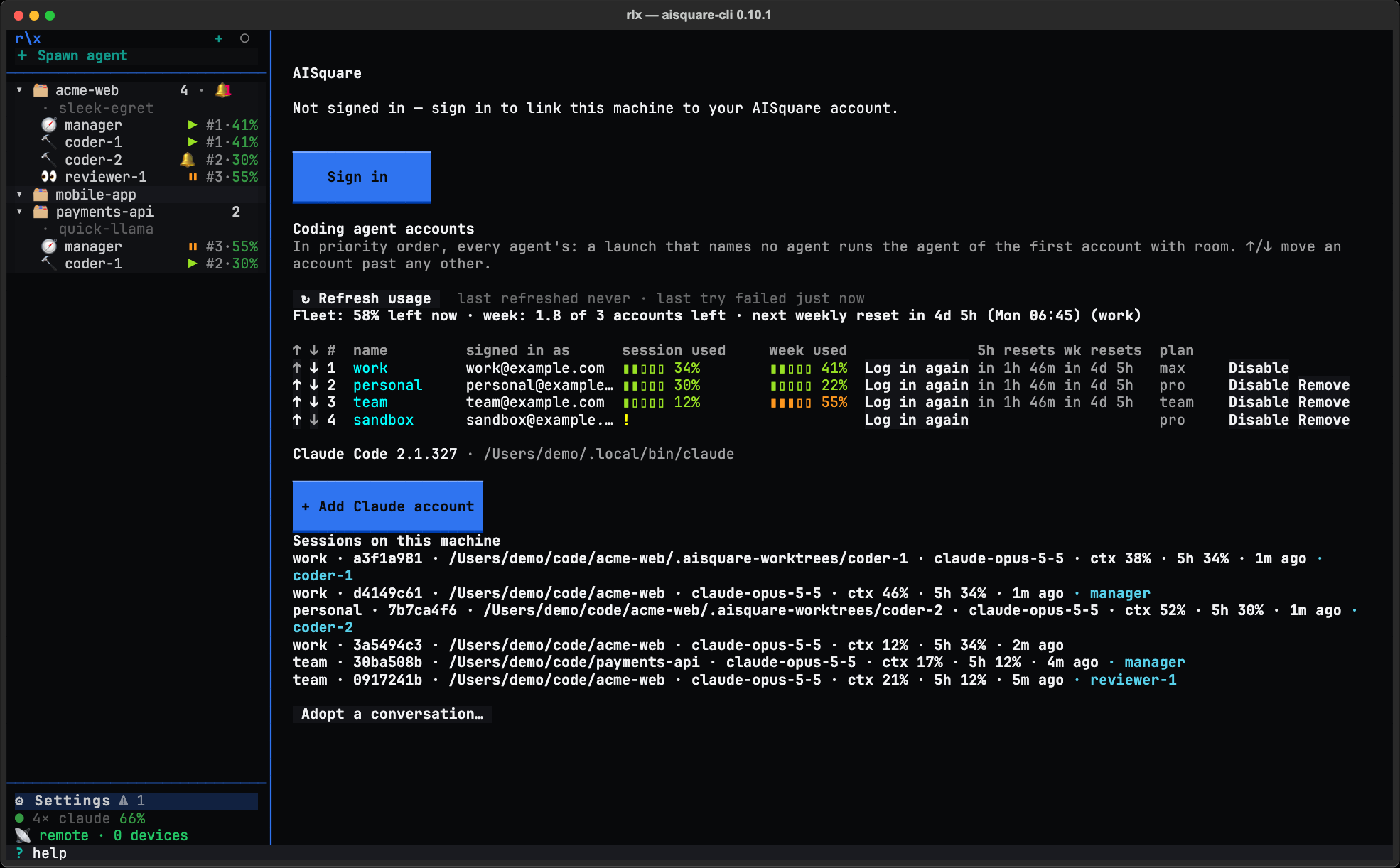
The AISquare card on top is your AISquare sign-in: who you are, when the
session expires, and Sign in (Sign in again while you are signed in)
or Sign out, the same as aisquare login and aisquare logout.
Below it, Coding agent accounts lists every agent's accounts in one priority order. It starts with ↻ Refresh usage, a dim line saying how old the readings are, and one line for the whole fleet:
Fleet: 58% left now · week: 1.8 of 3 accounts left · next weekly reset in 2d 4h (Thu 14:00) (account 3)"Left now" is the average room across your usable accounts, each counted by its fuller window. "Week" adds up what is left of each weekly window, in accounts: two accounts at 90 % and 20 % used have 0.9 of 2 left.
Then the table, one row per account in priority order:
| Column | What it shows |
|---|---|
| ↑ ↓ | Move the account one place in the priority order. The first enabled, signed-in row is the machine default. |
| # | The slot. Slot 1 is the plain claude of your machine (the CLAUDE_CONFIG_DIR of the shell you started rlx from, ~/.claude otherwise), and slot 0 the plain codex, once Codex has made its home. Every other slot is a directory under ~/.aisquare/claude-accounts/ for Claude Code or ~/.aisquare/codex-accounts/ for Codex, numbered in one sequence, so a number names one account whatever the agent. |
| name | account 2 until you rename it. Double-click it, or press Enter or F2 on the row, and type. When the table lists both Claude Code and Codex accounts, the name starts with the agent's mark, ✻ or >_. |
| signed in as | The email Claude Code recorded for the login. |
| session used, week used | A bar and the percent used of the five-hour and seven-day windows. |
| (login) | Log in when the slot has no login or its token is missing, expired or rejected. On a row that reads fine, Log in again gives the slot a fresh login the same way. |
| 5h resets, wk resets | How long until the window resets, such as in 3h 10m or in 2d 4h. Hover it for the clock time too, such as in 2d 4h (Tue 02:00), so a weekly reset six days away never looks like tonight. |
| plan | The subscription. |
Each row ends with Disable (or Enable) and, for a slot rlx
created, Remove. Remove forgets the slot: its directory is renamed beside
itself as <n>.removed-<stamp>, with the login, settings and transcripts kept,
so nothing is deleted until you delete it. Slot 1 cannot be removed; sign out
of it inside Claude Code.
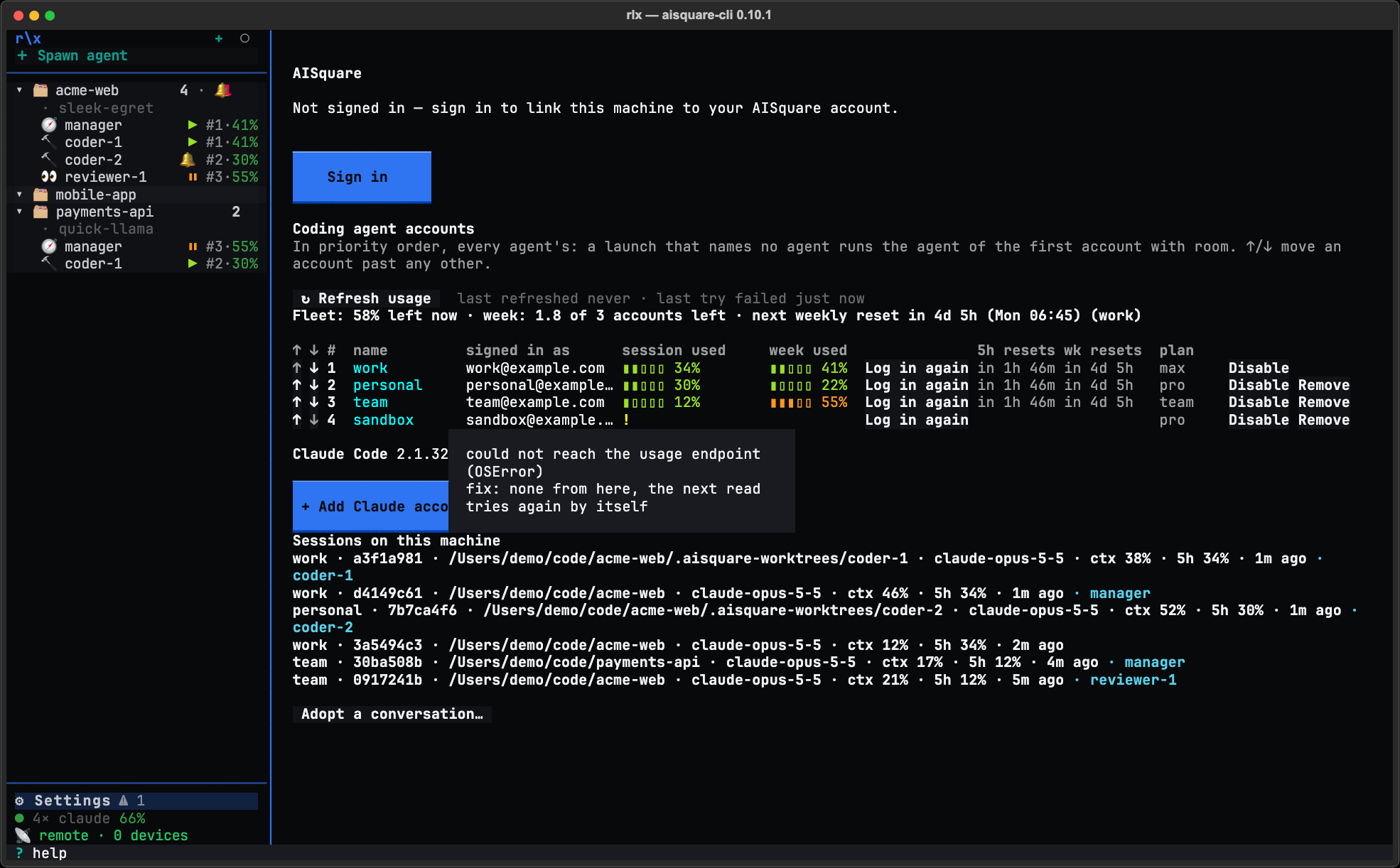
When a row has nothing to show, one ! stands across its two usage cells.
Hover it for the cause and the fix, such as the login Keychain is locked,
then unlock the login keychain, then ↻ Refresh usage. When a newer read
failed but an older one exists, the row keeps the last good numbers with
their age, such as 40% · 12m, and the tooltip says why the newer try read
nothing.
One usage cache serves everything. The page, the sidebar's status line,
rlx accounts usage and rlx accounts list --usage take a reading
up to five minutes old, so opening the page again asks nothing while the
readings are fresh. A headroom pick wants one under a minute old, so a spawn
can ask sooner (see How a launch picks an account).
↻ Refresh usage asks every account now (--refresh does the same on the
commands).
A rate-limited usage read backs off. When the usage endpoint answers
HTTP 429 (or 503 with Retry-After), that account is not asked again until
the wait ends: the endpoint's Retry-After, or one minute doubling per 429 in
a row, up to 30 minutes. The wait is recorded on disk, so no rlx
process, the page, --refresh, a headroom pick or a hand-over asks that
account again before it ends. Log in again does not clear it.
Under the table, the Claude Code line has + Add Claude account, which adds a slot (see Connect more than one Claude account), and once Codex is installed a Codex line has + Add Codex account. Adopt a conversation… brings a Claude Code conversation you started by hand into the fleet (see Adopt a conversation). Once you install rlx's Claude Code status line, a Sessions on this machine list shows every session that reported in the last 15 minutes: see See where your usage goes.
The status line
Under ⚙ Settings in the sidebar, a dim status line reads like
● 3× claude 58% ⚠. Once you add a Codex account, a line of its own under it
reads the same way, such as ● 1× codex 58%. Your AISquare sign-in is not in
the sidebar: it is at the top of this page.
- The claude dot and the figure are the room left across your usable accounts: each account's room is 100 minus the percent used of its fuller window, and the figure is the average, in the dot's colour.
3×counts the usable accounts: enabled, signed in, and read.⚠means an account needs a login, the same rows that show Log in on the Accounts page. In the sidebar's narrow width the figure gives way to the⚠rather than being cut.
| Claude dot | Room left, on average |
|---|---|
| green | over 50 % |
| yellow | 25 to 50 % |
| orange-red | 5 to 25 % |
| red | under 5 %, or every enabled account needs a login |
| 💀 | none left |
| grey | usage could not be read yet: offline, or a locked macOS Keychain |
The line opens Accounts when you click it. Press ? for the same legend in
rlx.
How a launch picks an account
Every launch asks the same question in the same order: fleet spawn,
rlx launch, the Spawn dialog and a manager spawning a coder alike. The
first rung that answers wins. A restart keeps the account the agent was
launched on.
--accounton the command line: a slot number, a name or an email.- The role's binding: the account select beside each role in
⚙ Settings ▸ App settings ▸ Agent settings ▸ Advanced, or
rlx accounts default <ref> --role coder(the same thingrlx team bind coder --account <ref>writes). - The project's default:
rlx accounts default <ref> --project . - Headroom, the default (
pick = "headroom"): of the accounts underswitch_at(85 % used), the first in priority order. An account counts as full as the fuller of its two windows, so one that has spent its week is never taken for an empty five hours. When every account is over the line, the one with the most room left is taken. - Rank 1, the machine default: the first enabled, signed-in account in the priority order. There is no separate default to set; moving an account to the top makes it the default.
With no account signed in, the agent runs on whatever claude the shell
already has, exactly as before rlx managed accounts.
A role bound to its own directory by hand keeps it. A role bound with
rlx team bind <role> --env CLAUDE_CONFIG_DIR=… (or --env-file) runs
on that directory: neither headroom nor rank 1 overrides it. --account, an
account binding, a project default and a usage-limit hand-over still do.
A few details that keep this predictable:
- Disabled accounts are skipped on every rung except
--account, which still reaches one by hand. A binding or project default that names a disabled account is skipped with a note, and the next rung decides. - A binding or default that names an account the machine no longer has
stops the launch rather than running it somewhere you did not mean.
rlx doctorflags it. - Model families. A pick knows the agent's model family, reads the weekly windows Claude keeps per family (Opus, Sonnet, Fable), and skips an account whose week for that family is spent. Every limit an agent hits is remembered on its account until its reset, so the next pick does not walk into it again.
preferorders the accounts under the line.priority, the default, takes them in your order;reset-soonesttakes the one whose weekly window resets first, so a week's allowance is spent before it lapses. Underpick = "default", rank 1 decides andpreferis not read.- Reads are cheap. The headroom pick uses a reading up to a minute old, so a burst of spawns asks the usage endpoint once. With only one account to choose from, nothing is read at all. An account whose usage does not answer is skipped with a note; when none answers, rank 1 decides.
rlx config set accounts.pick defaultturns the headroom rung off, so launches go to rank 1.
The Spawn dialog's Account field says what a spawn with no account runs on
before you press Spawn, such as (default: rank 1 · work) or
(default: headroom · work). The agent info line in rlx and
rlx fleet ls show the account each agent resolved to.
What happens at a usage limit
- The agent is marked. When an agent's turn ends on a usage limit, its row turns ⏳ limited with the reset time, and a line goes on the board. Claude Code's own wait-and-continue at the reset stays in place.
- The fleet decides whether to move it. With
on_limit = "switch", the default, the fleet hands the agent over by itself when another enabled, signed-in account is there to take it. If the limit lifts withinwait_if_reset_within_minutes(15 by default), it waits instead and says so on the board: a reset ten minutes away is cheaper than a cold start. - The agent moves. It is stopped as
rlx fleet stopwould stop it, then started again under the same label and task, in its worktree as it stands (the branch it was on, any uncommitted work), on the first account underswitch_atin your priority order (withprefer = "reset-soonest", the one of those whose week resets first). - It resumes its own session. When the agent's transcript is on disk, the
replacement resumes that same Claude Code session, keeps the task claims,
and is told in one line to continue. The board says
switched, with both accounts named. When the transcript is missing, the replacement starts a new session with a hand-off prompt built from the board, and still takes over the claims.
The manager is woken only when it has something to decide. A hand-over the
fleet is making wakes nobody; one that fails posts handover_failed, which
does. With on_limit = "wait", or when there is nowhere to move the agent,
the limited line wakes the manager and names rlx fleet switch <label>.
If no account has room, the automatic hand-over does not move the agent
onto another full account. It takes only an account under switch_at;
otherwise the agent stays parked with Claude Code's own wait intact, and
continues by itself at the reset. rlx doctor lists parked agents, and
rlx doctor --live warns when every account is over the line.
If the replacement does not start, the agent stays stopped, its task goes back to the pool, and the board records the exit, so the manager can staff the task again.
Only fleet agents are moved automatically. A Claude Code session you started
yourself is yours to move, or to adopt into
the fleet. With one account, switch behaves as wait.
You or the manager can move an agent at any time:
rlx fleet switch coder-auth                 # the first account with room in your order; session resumed
rlx fleet switch coder-auth --to work       # a named account
rlx fleet switch coder-auth --fresh         # a new session with a hand-off prompt from the board
rlx config set accounts.on_limit wait       # never move by itself; leave limited agents parked
A manual switch picks the same way. When every account is over the line, it
takes the one with the most room left, where the automatic one leaves the agent
parked. An agent the automatic hand-over
moved minutes ago is refused without --force: one switch per limit.
Moving before the limit
Off by default. before_limit acts before a limit, where on_limit acts
after one, so an agent changes accounts at a quiet moment instead of being cut
off mid-change.
rlx config set accounts.before_limit switch   # move an agent whose account crosses the line
rlx config set accounts.before_limit warn     # only say so on the board
rlx config set accounts.before_limit off      # the default
The line is switch_at itself, the same line every pick uses. With switch,
a fleet agent whose account reads at or over it is handed to an account under
the line at its next turn end or idle notice, never mid-turn. It waits five
seconds after the turn ends, then checks once more that the agent is idle at
its prompt before stopping it. The board says switched … (before limit), and
the manager is woken only if the move fails. With warn, one before_limit
line goes on the board per crossing of the line; it reaches no agent.
No move is made:
- while the turn left background work running (a background command, a
Monitor, a background subagent), which an/exitwould kill, or with a message queued for the next turn; - for the manager;
- for an agent put on its account by name (
--account, a role's account binding, or a binding that setsCLAUDE_CONFIG_DIR); - when the windows over the line reset within
wait_if_reset_within_minutes, or no other account is under the line; - in a paused fleet, for a finished worker that is about to be stopped anyway, or within ten minutes of the agent's start or the last look at it.
No hook sends a usage request: the turn end decides from the usage cache whether to look, and a background worker does the reading, honouring any back-off.
Folder trust, shared across accounts
The first time Claude Code starts in a folder, it asks "Is this a project you created or one you trust?", once per account, with No, exit highlighted. So a folder you trusted on account 2 would be a stop sign on accounts 1 and 3.
Every launch (fleet spawn, fleet restart, fleet switch,
rlx launch, rlx accounts run) copies the folder's trust into the
account it runs on whenever another account already has it, and the receipt
says so. Only that one entry of the account's .claude.json is written, under
Claude Code's own lock, and rlx never adds a trust that nobody gave.
Claude Code's own rules decide what a yes covers. In a git checkout the yes belongs to the repository, so its worktrees and sub-folders are covered. Outside git, a folder covers its sub-folders. A folder above a repository does not cover the repository.
rlx accounts trust                          # trust this folder on every account (its repository, in a checkout)
rlx accounts trust ~/work/api               # a named folder
rlx accounts trust --sync                   # every folder any account trusts, trusted on all of them
rlx config set accounts.share_trust false   # stop copying trust at launch (on by default)
An agent that still meets the question, because no account trusts the folder
yet, shows 🔔 in the sidebar, and 🔔 NEEDS YOU with waiting for folder
trust in fleet ls and on the Remote phone page. A spawn never types its prompt into that
dialog. Approve it once in the agent's pane, or run rlx accounts trust
for the folder.
What accounts share
One settings.json
Off by default. Turn on share settings.json in App settings ▸ Agent
settings ▸ Advanced (accounts.share_settings) and every managed account's
settings.json becomes a link to the plain claude's, so a permission, hook,
model or status line change made on any account is made on all of them. Each
account's own file is kept beside it as settings.json.own-<stamp>.
Logins are never shared. .claude.json and .credentials.json stay per
account, and a settings.json that sets what decides a login
(apiKeyHelper, forceLoginMethod, forceLoginOrgUUID, an env API key,
OAuth token or cloud provider, CLAUDE_CONFIG_DIR) is neither shared nor
replaced. The command names the setting that stopped it.
rlx accounts settings                       # what each account's settings.json is: shared, its own, none
rlx accounts settings --sync                # link them now
rlx accounts settings --unshare             # give each linked account its own copy back
rlx config set accounts.share_settings true # relink at every launch
Memory, skills, agents, commands and CLAUDE.md
Empty by default. rlx accounts share picks what every account has in
common, so an agent moved to another account still finds them:
| Part | What sharing does |
|---|---|
memory | Every launch gets one Claude Code auto-memory directory per project, under ~/.aisquare/claude-shared/memory, merged from every account the first time. |
skills, agents, commands, claude_md | Each managed account's entry becomes a link to the plain claude's. Its own is kept beside it as <entry>.own-<stamp> until you stop sharing it. |
plugins | Experimental: MCP logins and the plugin store are per account. |
rlx accounts share --status                 # what every account holds; changes nothing
rlx accounts share --enable memory,skills   # share these
rlx accounts share --disable skills         # each slot's own comes back
Transcripts are never shared: a session moved to another account resumes by
its path. A slot added later is linked at its first launch. rlx doctor
warns on a part that is on but a slot does not share.
Name, order and disable accounts
- Name. Rename in place on the page, or
rlx accounts alias 2 "Work laptop". A name is any text up to 64 characters, but not only digits and never with an@. It replacesaccount 2everywhere the slot is named (the row, the board,fleet ls, the launch line) and is accepted, in any case, wherever a slot number is:--account "work laptop". - Order. The ↑ and ↓ on the page,
rlx accounts order work 3, orrlx accounts move 3 top. The order is how rows are listed, the order a headroom pick tries them in, and its first enabled, signed-in account is the machine default. - Disable.
rlx accounts disable 3keeps an account out of every automatic choice;--account 3still reaches it.enableputs it back. - Defaults. For a project,
accounts default 3 --project .; for a role,accounts default 1 --role coder.--clearremoves either. At machine levelaccounts default 2is the same asaccounts move 2 top, and a machine-level--clearis refused, since some account is always first. Barerlx accounts defaultshows what stands.
Commands
Every reporting command takes the global --json (rlx --json accounts list). add and run hand the terminal to Claude Code, so they have no JSON
form.
rlx accounts                          # the slots, offline (same as accounts list)
rlx accounts list --usage             # plus both windows, percent used
rlx accounts usage                    # the windows per signed-in account, the fleet's `all` row and line
rlx accounts usage --refresh          # read now instead of from the five-minute cache
rlx accounts add                      # a fresh slot, signed in through Claude Code's login
rlx accounts run 2                    # a plain Claude Code session on account 2
rlx accounts run 2 --model opus       # arguments after the slot go to claude
rlx accounts remove 2                 # the directory is kept as 2.removed-<stamp>
rlx accounts default 2                # make account 2 rank 1, the machine default
rlx accounts default 3 --project .    # this project's default
rlx accounts default 1 --role coder   # coders run on the plain claude
rlx accounts alias 2 work             # a name: --account work
rlx accounts order work 3             # the priority order; the rest follow
rlx accounts move 3 top               # up, down, top or bottom
rlx accounts disable 3                # out of automatic selection; enable puts it back
rlx accounts trust                    # trust this folder on every account
rlx accounts settings --sync          # one settings.json for every account
rlx accounts share --enable memory    # one auto-memory per project across accounts
rlx accounts statusline --install     # usage inside Claude Code's own status line
rlx accounts sessions --since 1h      # every session that reported through that status line
rlx launch coder --account 2          # one launch on a named account
rlx fleet spawn coder --account work  # one fleet agent on a named account
rlx fleet switch coder-auth           # move a running agent to the account with room
rlx fleet adopt --list                # conversations you started by hand, to adopt
When a usage read fails, accounts usage and accounts list --usage print the
reason with its fix after it, and --json carries cause and fix on the
row. rlx --json accounts usage --summary returns
{"accounts": [...], "summary": {...}}, the fleet's figures beside the list.
Settings
All of these live in the [accounts] section of ~/.aisquare/config.toml.
Change them with rlx config set accounts.<key> <value>. The ones with an
App settings label are also in ⚙ Settings ▸ App settings ▸ Agent
settings: launches pick and on a usage limit on the tab, the rest under
its Advanced. They are read from the config file only; no environment
variable sets them.
| Key | Default | What it does |
|---|---|---|
pick | headroom | How a launch chooses when nothing names an account. headroom takes an account under switch_at; default takes rank 1. App settings: launches pick. |
on_limit | switch | What happens when an agent hits its limit. switch moves it to an account with room; wait leaves it parked for you or the manager. App settings: on a usage limit. |
before_limit | off | Before a limit: switch moves a fleet agent whose account crosses switch_at at its next turn end; warn only says so on the board. See Moving before the limit. |
switch_at | 85 | The percent used (1 to 100) at which an account counts as full, measured on its fuller window. It is also where doctor --live warns. (The page's bars turn yellow at 50 % and red at 80 % used, whatever this is set to.) App settings: switch at (% used). |
prefer | priority | Which account under the line a pick takes: the first in your order, or reset-soonest, the one whose week resets first. App settings: under the line, prefer. |
wait_if_reset_within_minutes | 15 | A limit (or, for before_limit, a crossing) that resets within this many minutes is waited out instead of switched. App settings: wait if reset within (min). |
share_trust | true | Copy a folder's trust into the account a launch runs on when another account has it. App settings: share folder trust. |
share_settings | false | Keep every managed account's settings.json linked to the plain claude's. App settings: share settings.json. |
share | empty | What every account has in common: any of memory, skills, agents, commands, claude_md, plugins. Set it with rlx accounts share. |
Honest limits
- Usage comes from an undocumented endpoint. It is the endpoint Claude
Code's own
/usagereads, called with the token in each account's credentials. It is not a documented API and can change, so everything built on it is best effort. When it does not answer, the row keeps its last good reading with its age, and a pick never takes a kept reading for a live one. A token the endpoint refuses asks for Log in at once. - rlx never refreshes a token or writes a login. The email and plan
are read from what Claude Code recorded, and Claude Code refreshes a token on
the account's next session. Besides installing rlx's hooks when you add
an account, the only writes into an account's directory are the trust entry,
and what you turn on: the
settings.jsonlink, the shared parts, and the status line. - macOS. The token is read from the login Keychain item Claude Code keeps
for each account, and from
.credentials.jsonwhen there is no item. A locked Keychain, or one that refuses rlx, shows as!on the row with the fix in its tooltip, instead of offering a Log in. It is not asked again by itself, so its unlock dialog does not come back every minute; opening the page, ↻ Refresh usage or a Log in asks again. - Accounts laid out another way, such as a wrapper script, a proxy or a
directory of your own, are not slots. Bind them to a role as a launch profile
with
rlx team bind <role> --env …instead; App settings ▸ Agent settings ▸ Advanced ▸ Role bindings lists and edits them.
rlx doctor reports on accounts with these lines:
| Doctor line | When it shows or warns |
|---|---|
claude-accounts | An added slot still needs a sign-in. The fix names rlx accounts run <slot>. |
claude-accounts sharing | A part of [accounts] share is on but a slot does not share it. |
claude-account-default | Shown once a project default or role binding is set: names rank 1, or warns that no enabled account is signed in. |
claude-account-bindings | A role or project names an account this machine no longer has, so its launches are refused. |
claude-account-limits | Agents parked on a usage limit, with the fleet switch that moves each. |
claude-account-backoff | Accounts whose usage reads are backed off after a 429 (or a 503 with Retry-After), and until when. |
claude-account-headroom | With --live: every account is over switch_at, or no account's usage could be read. |
role bindings | A role bound by hand to a CLAUDE_CONFIG_DIR that is not a directory or has no rlx hooks, or to a CLAUDE_CODE_TMPDIR that cannot be written. Absent with no such binding. |
Connect more than one Claude account
Add an account in rlx, set its rank, and let the fleet use it.
See where your usage goes
Usage & stats, the fleet's headroom, and usage in Claude Code's status line.
Run a fleet
The roles, the manager's loop, worktrees, and every fleet command.
Your fleet on your phone
See limited agents and switch them from your phone.
Run a fleet
Tell one rlx manager what you want in plain words. It writes the tasks, staffs them with coders, testers and reviewers in their own worktrees, and tells you when the work is ready for you to merge.
Projects
A project in rlx is a folder you add on purpose. Add it once, give it a name you recognise, arrange the sidebar so the work you care about is on top, and start it fresh when you reuse it.