

The board
The live cockpit for your AI team. Session states, the task table, the event feed, a detail bar, and a jump into any session's transcript.
aisquare board -wThe watch board is a full-screen terminal app (installed with the [tui]
extra; without it you get a simpler auto-refreshing view). Board on the left,
live feed on the right, detail bar at the bottom.
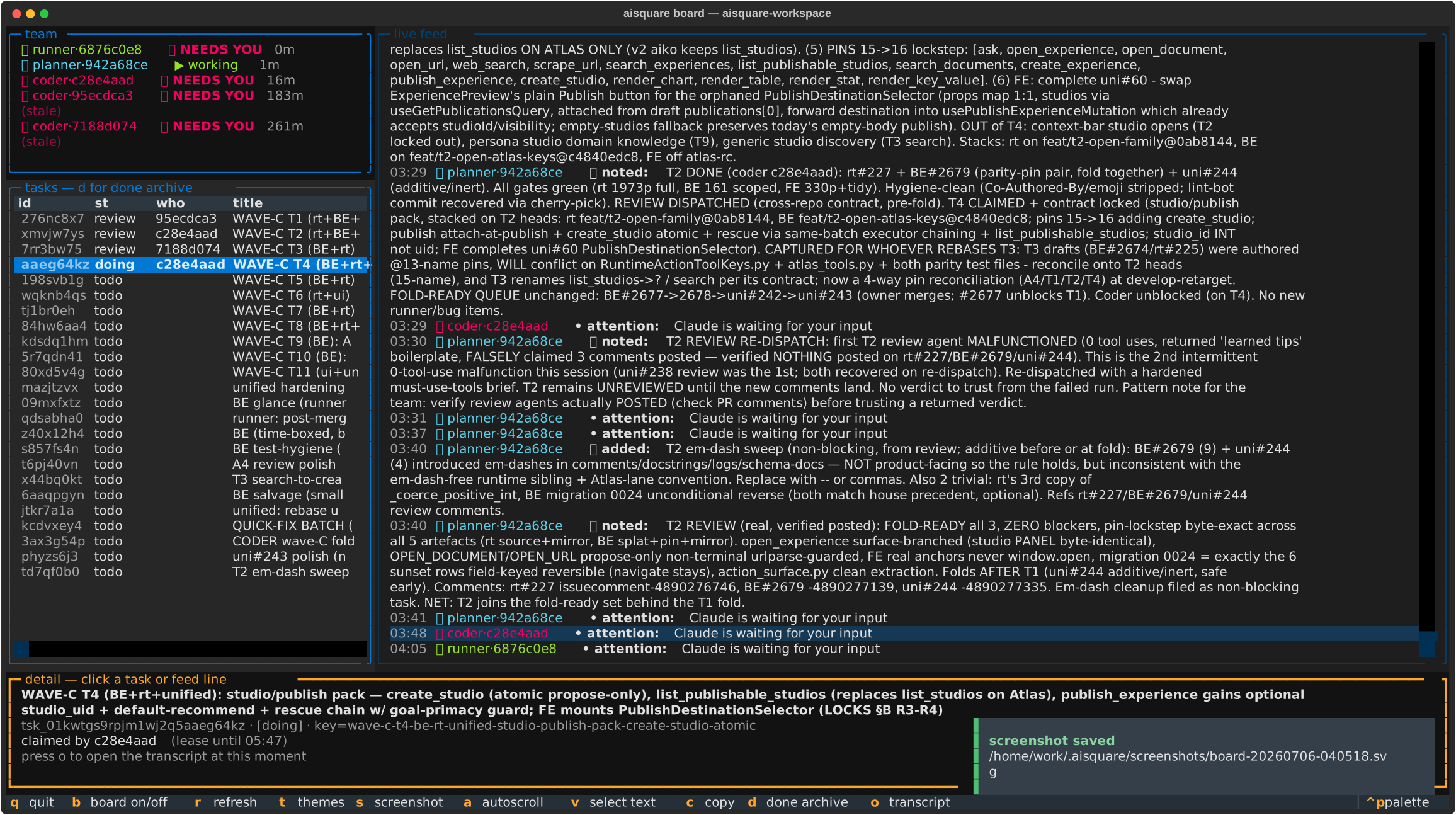
Session states
Every session shows what it is doing right now:
| Chip | Meaning |
|---|---|
▶ working | mid-turn, actively doing something |
⏸ waiting for input | finished its turn, wants your next prompt |
🔔 NEEDS YOU | asked for permission or has been idle; the terminal bell rings once |
The states are driven by Claude Code lifecycle hooks, so they update within a refresh interval of the real session, and one open board terminal is enough to know who needs you next.
Reading the feed
One line per team event, bot-style: who (role, color, emoji), the verb, the content. Click or arrow onto any line and the detail bar shows the full, unclipped text plus its task link and timestamp.
Keys
| Key | Action |
|---|---|
d | flip the task table to the done archive: when each task closed and who closed it |
o | open the selected item's session transcript at that exact moment |
t | theme browser: stays open, every change applies instantly and autosaves |
a | toggle feed autoscroll |
v / c | select-text mode (a frozen, mouse-selectable feed) / copy the selection |
s | save an SVG screenshot to ~/.aisquare/screenshots/ |
b | show or hide the board pane (auto-hides on narrow terminals) |
r / q | refresh now / quit |
Two of those deserve a sentence more:
The done archive (d). Completed work does not vanish. The archive lists
every closed task, newest first, with the closing time and the session that
closed it (attribution comes from the task event, so it survives the claim
being cleared).
Transcript jump (o). Sessions record where their Claude Code transcript
lives. Select a done task or any feed event and press o: the board suspends
and opens that session's transcript at the line nearest that moment, in your
$EDITOR (or less). Quit the viewer and you are back on the live board. It
answers "who did this and what exactly happened" in two keystrokes.
s key.